AI Art Prompts: Copy-Ready Prompts for Painting, Anime, 3D and More
AI art prompts by medium, with real oil, ink, gouache, pixel and linocut-style outputs on Omnely.
Below are copy-ready ai art prompts built from a single formula, each paired with a real square output from Omnely so you can see what the prompt actually renders.
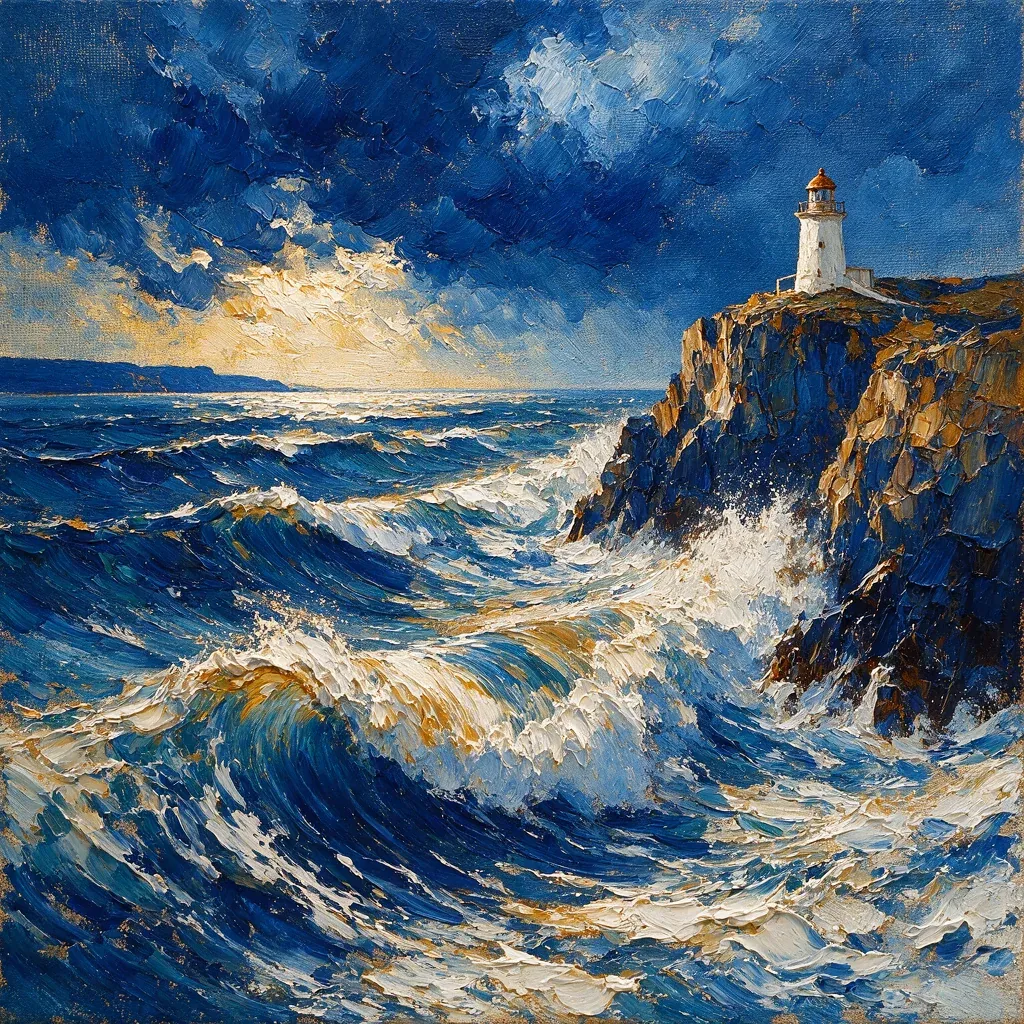
Oil painting of a stormy sea with a small white lighthouse on a rugged cliff, thick impasto knife strokes, cobalt and ochre palette, dramatic diagonal composition, canvas texture, no text
*Thick blue and ochre brush-like marks surround the lighthouse on the right cliff. Single generated example from Seedream 5 Pro, 1K, 10 credits on Omnely.*
Run this prompt on Seedream 5.0 Pro (10 credits at 1K) to try the lighthouse prompt shown above.
How to read these ai art prompts
Every prompt in this guide follows the same five-slot formula. Learn the slots once and you can rewrite any of the nine templates into your own subject in seconds.
Medium formula: *subject + material + technique + palette + composition*
- Subject — the thing being depicted (a badger, a tram, two cranes).
- Material — the physical medium being imitated (oil paint, sumi ink, cut paper, pastel).
- Technique — the mark-making behavior of that material (impasto knife strokes, tapering brush, gouge marks, dry brush edges).
- Palette — two to four color anchors (cobalt and ochre, navy cream and gold, pale green and lilac).
- Composition — framing and negative space (diagonal, large empty paper, dense decorative border).
The outputs below are single examples generated at square 1K on Seedream 5.0 Pro or GPT Image 2, each at 10 credits. Nano Banana 2 is another option, but was not run for this article. These examples are not a model ranking. New users get free credits to try these; the models require a paid Omnely plan.
Model outputs imitate the *appearance* of materials. They are not actual handmade prints, carved blocks, or editable vector files.
1. Oil painting prompt
Oil painting of a stormy sea with a small white lighthouse on a rugged cliff, thick impasto knife strokes, cobalt and ochre palette, dramatic diagonal composition, canvas texture, no textRendered on Seedream 5.0 Pro, this prompt produced the lighthouse scene at the top of the post. The visible texture reads as thick paint built up in ridges, and the dark-blue water sits against ochre cliff in the diagonal split asked for in the composition slot. The words *impasto* and *knife strokes* are doing the heavy lifting — remove them and the surface flattens into generic digital painting.
Swap ideas
- Subject: harbor at dusk, poppy field, mountain pass
- Palette: viridian and burnt sienna, lavender and lemon
2. Gouache illustration prompt
Opaque gouache illustration of a yellow tram winding through a hillside town, stacked pastel buildings, matte blocks of color, warm afternoon light, visible dry brush edges, no text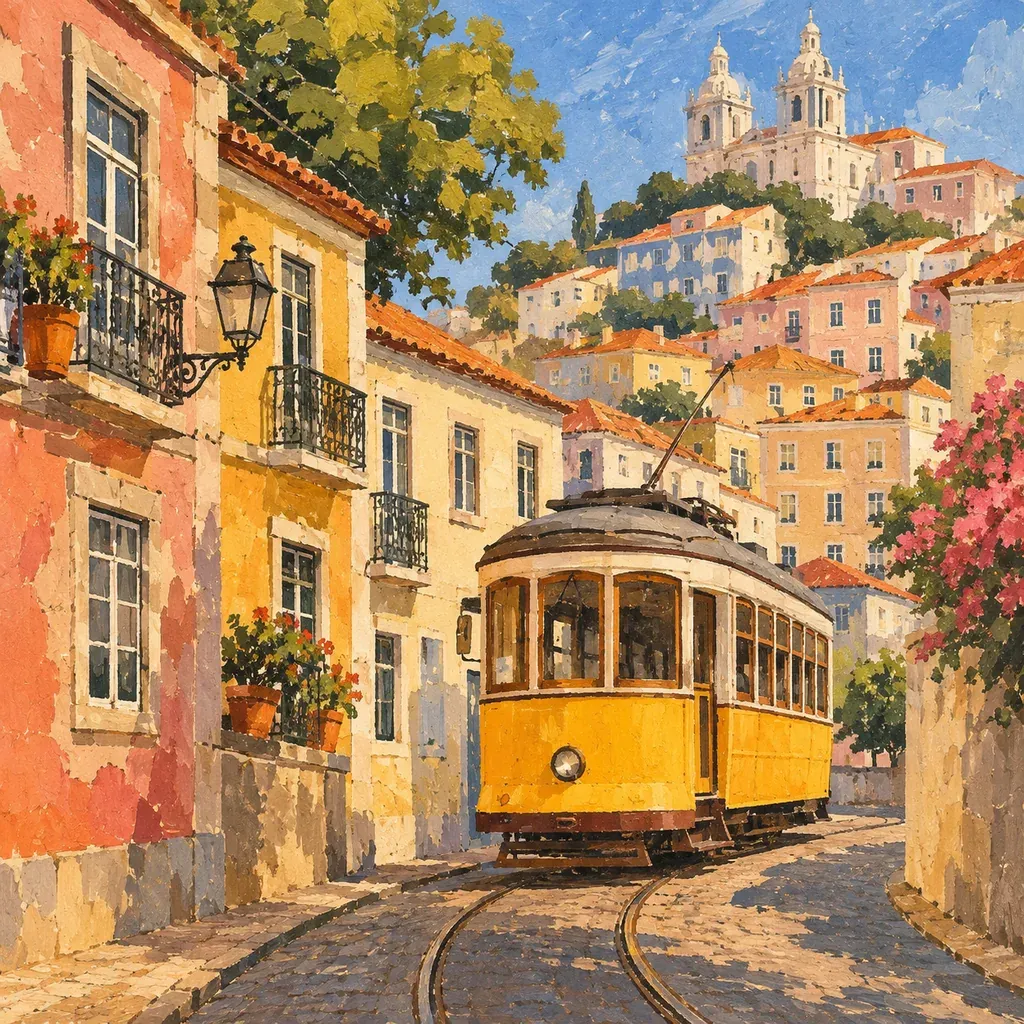
*The yellow tram and warm town are visible, but the paint treatment is denser and less flat than requested. Single generated example from GPT Image 2, 1K, 10 credits on Omnely.*
Rendered on GPT Image 2. The warm hillside town and yellow tram arrive on the first try, but notice the surface is denser and more painterly than the flat matte blocks the prompt requested. Gouache in a real sketchbook holds crisper edges between color areas; the model reads the words *opaque* and *matte* as a texture rather than a strict rule. If you want flatter blocks, drop *textured* words and push *poster-like* and *hard-edged shapes*.
3. Sumi ink prompt
Black sumi ink painting of two cranes standing among reeds in morning mist, expressive tapering brush strokes, large empty white paper areas, restrained gray washes, no text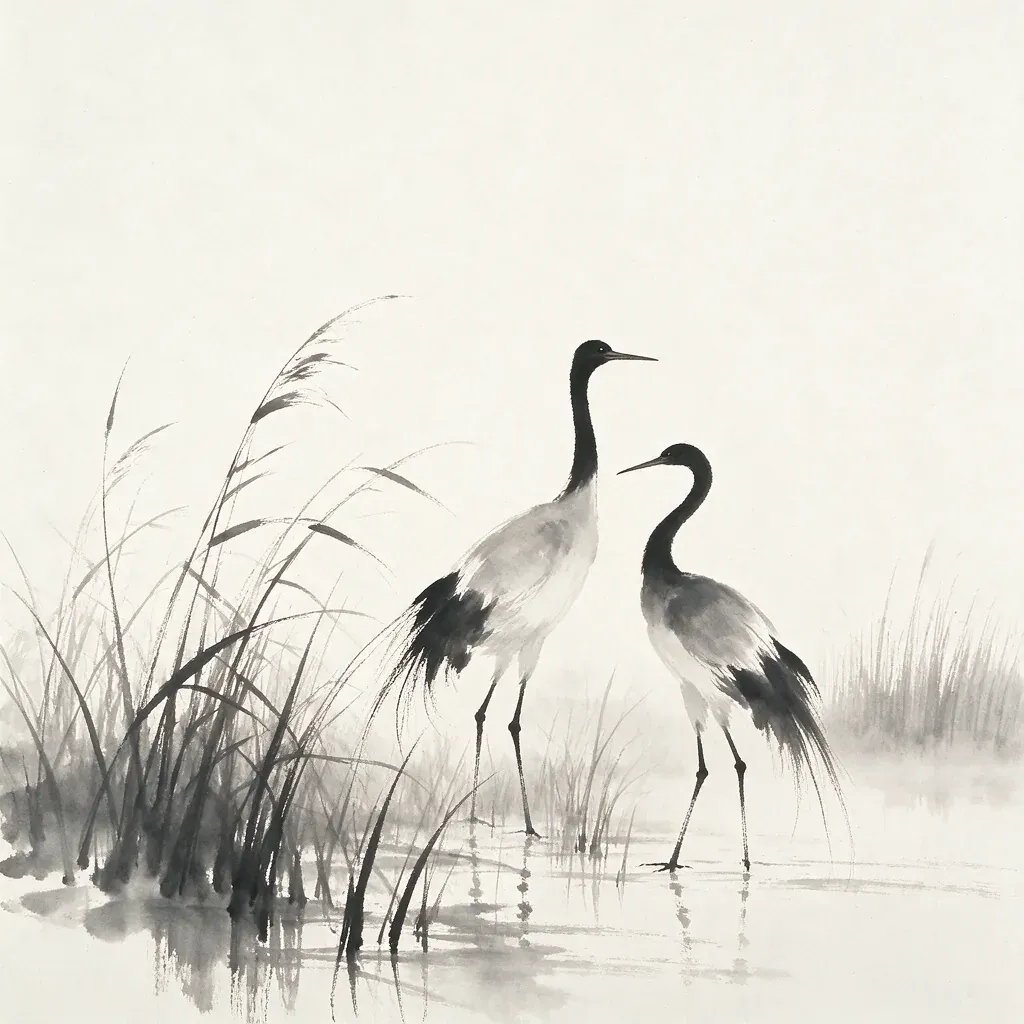
*Two cranes and sparse reeds leave broad untouched-looking white areas. Single generated example from Seedream 5 Pro, 1K, 10 credits on Omnely.*
Rendered on Seedream 5.0 Pro. Sumi ink is defined as much by what is left out as what is drawn, and the output honors that: the cranes and a few reeds anchor the frame while most of the paper stays blank. The gray washes stay thin, and the brush marks taper the way loaded sumi brushes do when lifted off the paper. If the output ever feels too busy, add *minimum marks* and *90% empty paper*.
4. Linocut print prompt
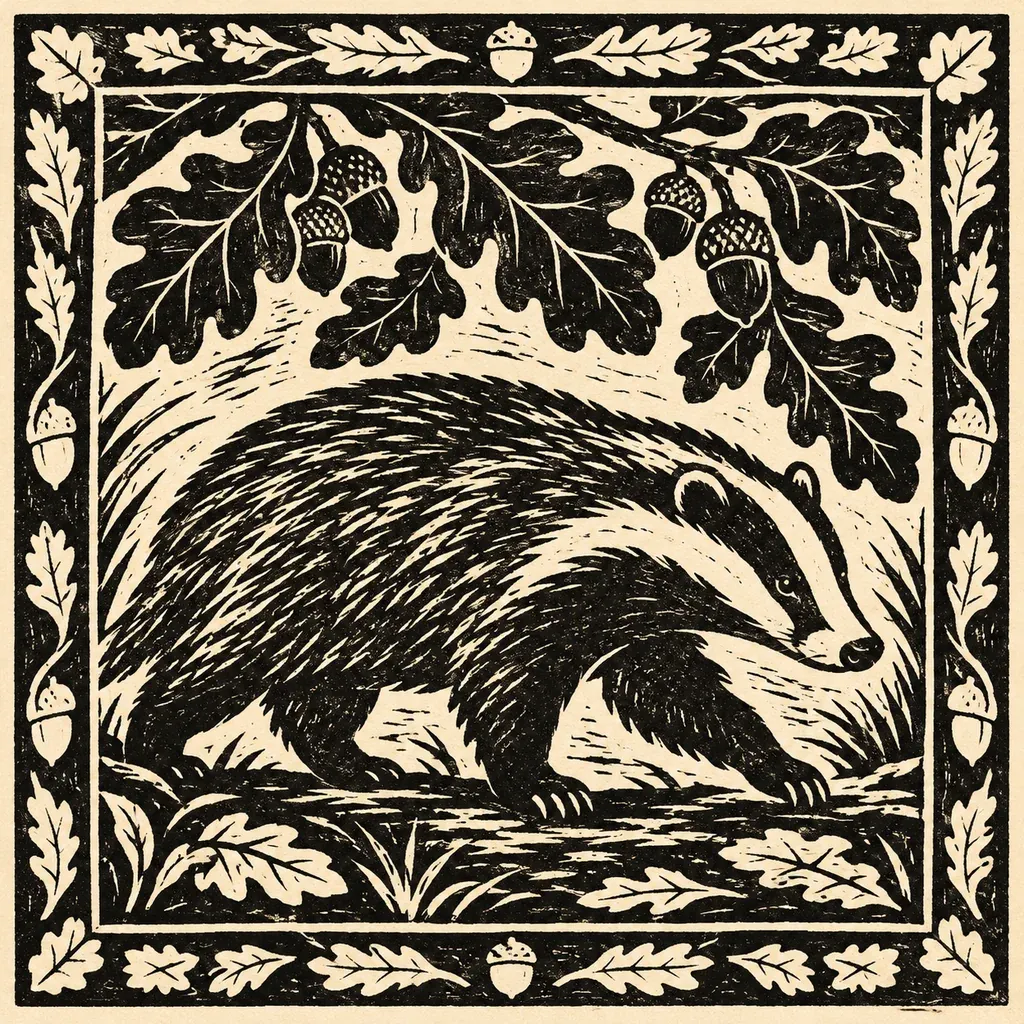
Two-color linocut print of a badger walking beneath oak leaves, bold carved black shapes and cream paper, rough cut marks, dense decorative border, no text
*The badger, oak leaves and border use strong black-and-cream carved-looking marks. Single generated example from GPT Image 2, 1K, 10 credits on Omnely.*
Rendered on GPT Image 2. The badger reads as a two-color relief print: large black shapes, cream paper showing through carved channels, and a thick decorative border around the scene. Keep in mind this is the *look* of a linocut, not separated printing plates — you cannot pull a real print from this file. The phrases *carved shapes* and *rough cut marks* are the ones to protect in your rewrites; without them, you drift into flat vector illustration.
5. Pixel art prompt
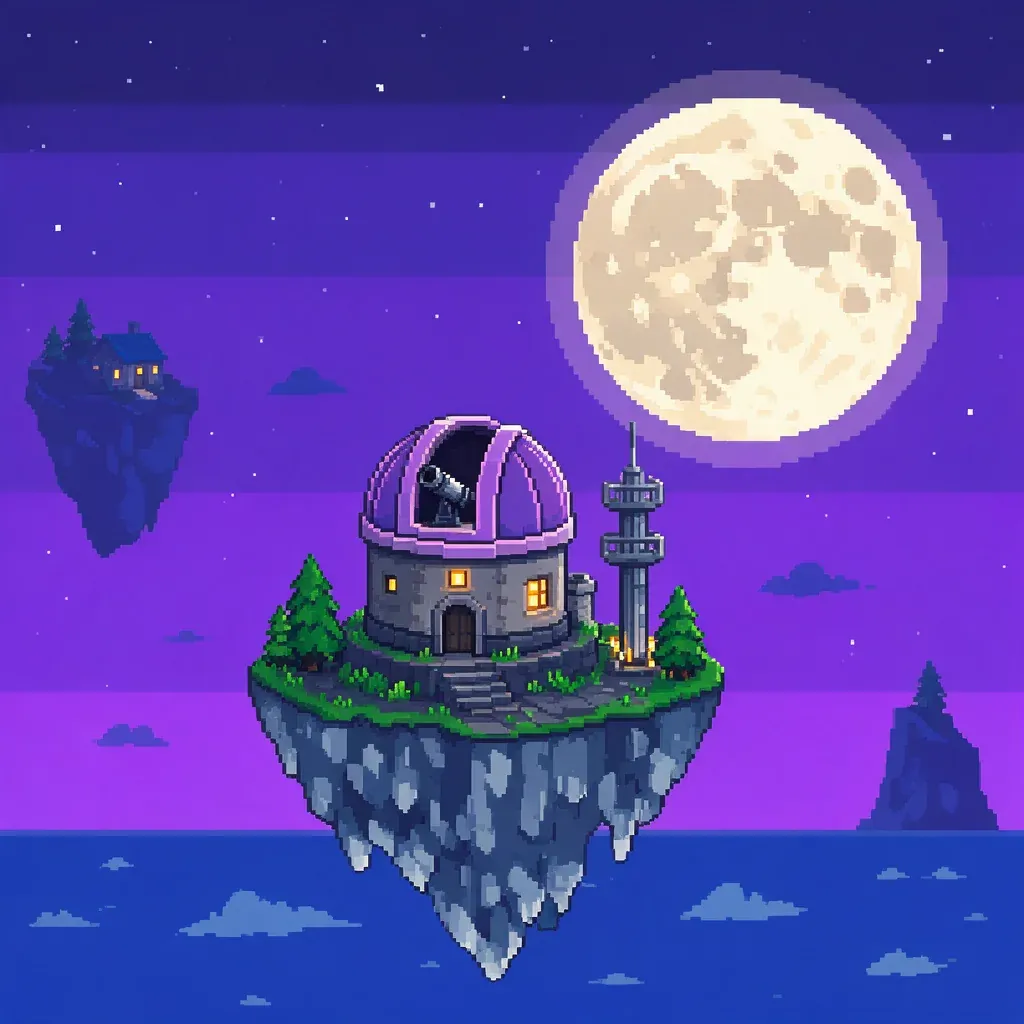
Pixel art of a tiny moon observatory on a floating island, limited 16-color palette, crisp visible square pixels, violet night sky, no gradients, no text
*The floating observatory has pixel-like edges, but the many shades do not establish a strict 16-color result. Single generated example from Seedream 5 Pro, 1K, 10 credits on Omnely.*
Rendered on Seedream 5.0 Pro. The purple observatory island and large moon land cleanly, and the edges are pixel-shaped rather than smooth. The strict *16-color palette* request, however, is not obeyed at the pixel level — the output uses many more shade steps than a classic game-sprite constraint. Treat pixel prompts as *pixel-styled* illustrations. For tighter results, specify a small canvas pixel grid in words like *chunky 2-pixel edges*.
6. Charcoal drawing prompt
Charcoal drawing of an old twisted olive tree on textured paper, rich dark trunk, smudged shadows and erased highlights, expressive hatching, no text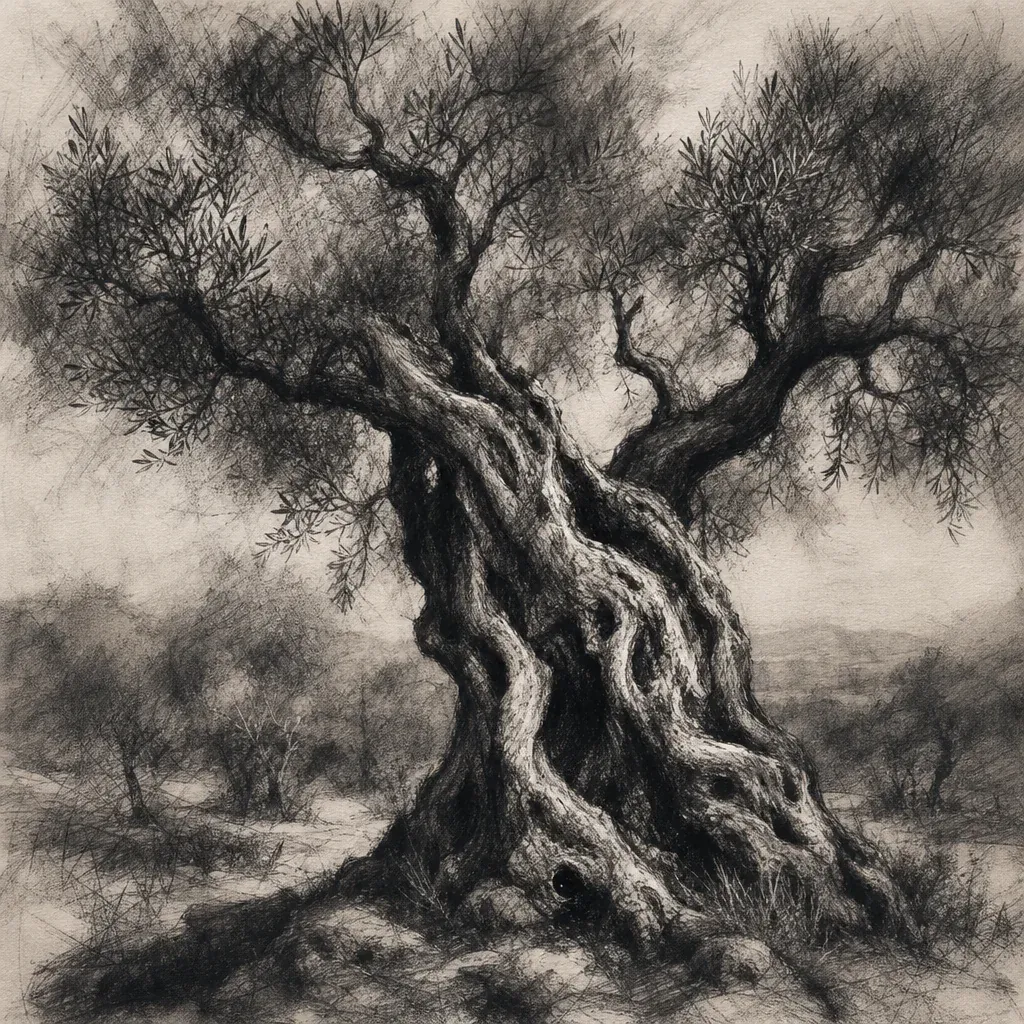
*The olive tree has a dark twisted trunk and dense rubbed-looking charcoal texture. Single generated example from GPT Image 2, 1K, 10 credits on Omnely.*
Rendered on GPT Image 2. The olive tree fills the frame with dense rubbed texture, smudged mid-tones, and branches that spread wide. Charcoal depends on three mark types — line, smudge, and erased highlight — and naming all three in the technique slot is what keeps the output from collapsing into a generic pencil sketch.
7. Soft pastel prompt
Soft pastel drawing of a field of purple irises beside a winding stream, dusty pigment texture, pale green and lilac palette, luminous dawn, no text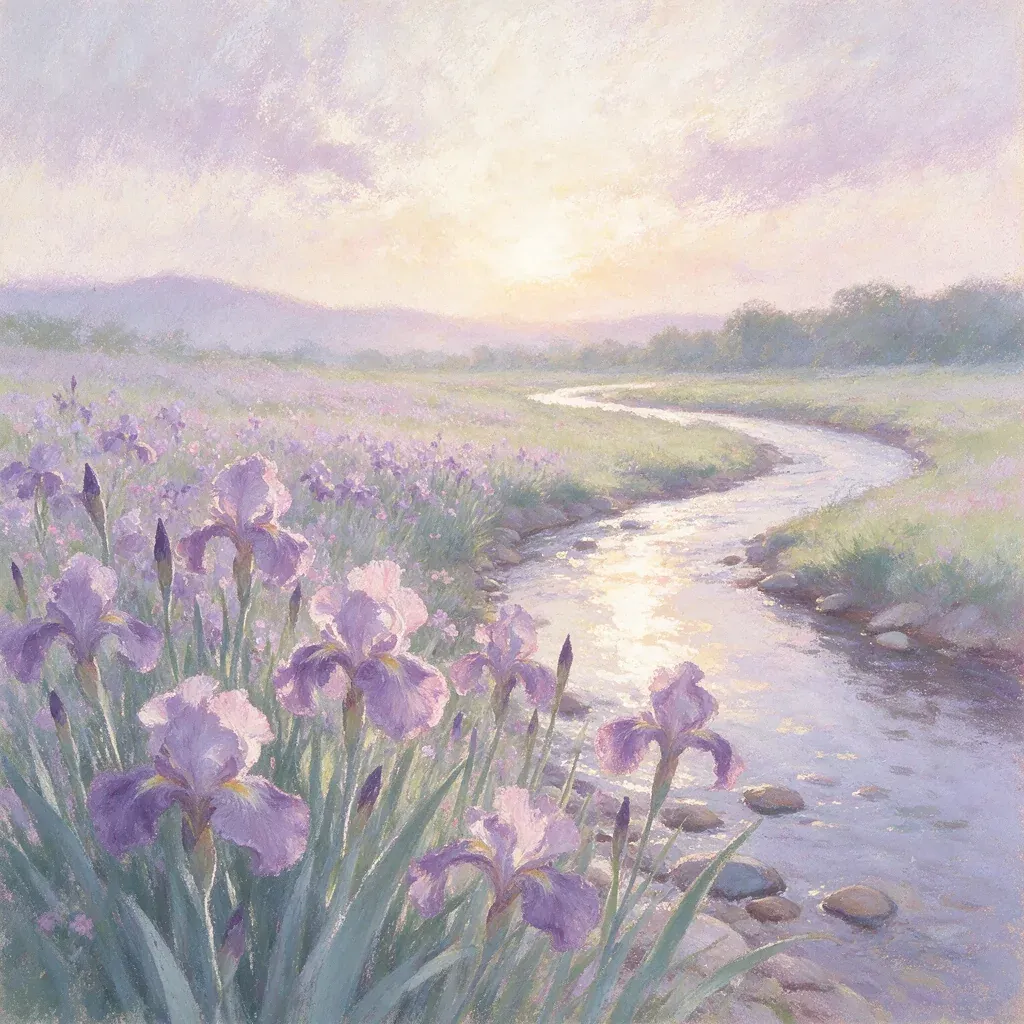
*Soft lilac irises frame a winding stream with hazy edges. Single generated example from Seedream 5 Pro, 1K, 10 credits on Omnely.*
Rendered on Seedream 5.0 Pro. The output leans into the soft, slightly powdery edges that define the medium, with pale lilac and green pigment carrying most of the composition. *Luminous* in the palette slot is useful — it nudges the model toward a glow in the sky rather than a flat wash.
8. Paper-cut prompt
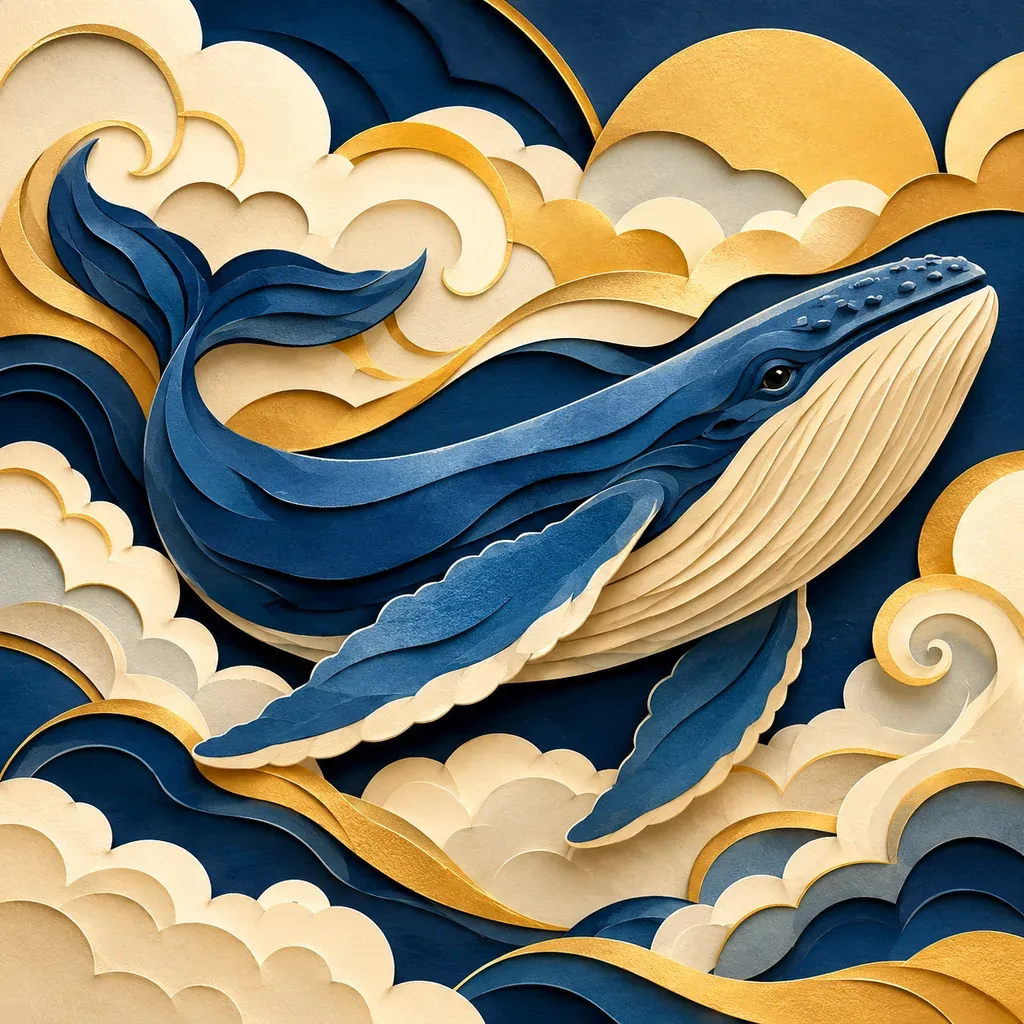
Layered paper-cut illustration of a blue whale swimming through swirling clouds, visible cut edges and cast shadows between layers, navy cream and gold palette, no text
*The whale sits among layered cream and gold clouds with visible edge shadows. Single generated example from GPT Image 2, 1K, 10 credits on Omnely.*
Rendered on GPT Image 2. The whale sits between cream and gold cloud layers with soft shadows visible where one layer sits above another — the detail that sells the handmade look. The requested palette expands a little (the blues get richer shading than a strict three-paper cut-out), but the stacked-plane structure is intact. If you want fewer tones, add *flat solid papers only*.
9. Anime background prompt
Anime background illustration of an abandoned greenhouse filled with glowing mushrooms at midnight, crisp ink outlines, blue green luminescence, carefully painted foliage, no characters, no text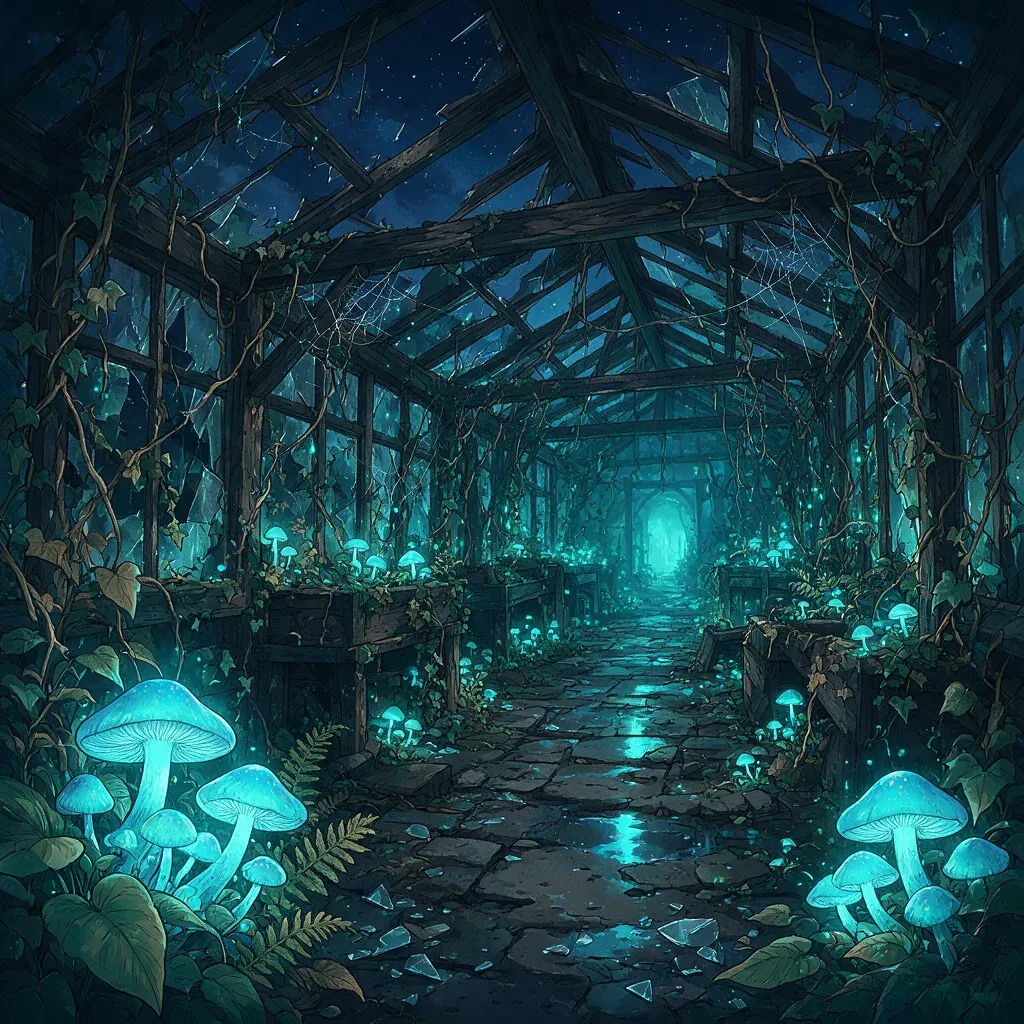
*The greenhouse is dark with glowing turquoise mushrooms and defined roof beams. Single generated example from Seedream 5 Pro, 1K, 10 credits on Omnely.*
Rendered on Seedream 5.0 Pro. The dark overgrown greenhouse comes through with turquoise mushroom light and a crisp roof silhouette. The explicit *no characters* is important — anime prompts drift toward figures by default, and stating the exclusion keeps the scene as pure environment art.
Six more templates to try (text only)
These are untested slots using the same subject + material + technique + palette + composition formula. Paste any of them into Seedream 5.0 Pro, GPT Image 2, or Nano Banana 2 and tune from there.
Low-poly 3D
Low-poly 3D render of a tiny snowy mountain scene with a cabin and pine trees, flat triangular facets, soft studio lighting, pale blue and warm beige palette, centered isometric composition, no textWatercolor
Loose watercolor painting of a vintage bicycle leaning against a stone wall with trailing ivy, wet-on-wet bleeds and granulating pigment, muted sage and terracotta palette, generous white paper margins, no textEmbroidery
Hand embroidered illustration of a hummingbird beside a thistle flower on natural linen, visible satin and chain stitches, raised thread texture, saturated teal magenta and olive thread palette, oval framed composition, no textRisograph
Two-color risograph print of a quiet city laundromat at night, grainy misregistered dots, fluorescent pink and navy inks, slight paper show-through, flat shapes and limited shading, no textWoodcut
Traditional woodcut print of a leaping deer in a forest, thick carved black lines and visible wood grain, cream paper, dense parallel hatching for shadows, bold symmetrical composition, no textStipple
Fine-tip pen stipple drawing of a seated barn owl, dense dot clusters building the darks and sparse dots in the highlights, pure black ink on cream paper, tightly cropped portrait composition, no textPrompt-writing tips pulled from the nine outputs
- Name the marks, not the vibe. *Impasto knife strokes* and *tapering brush* change the surface; *beautiful* and *stunning* do not.
- Use the palette slot to limit colors. Two to four named colors produce cleaner work than general words like *warm*.
- Protect negative space with words. Add *large empty paper*, *generous margins*, or *minimum marks* when a medium relies on blank areas.
- Exclude what you don't want. *No text*, *no characters*, *no gradients* — these state intent, but each output still needs checking.
- Specify a resolution with intent. 1K is efficient for sketching variants; 2K and 4K reveal texture detail on GPT Image 2 and Nano Banana 2.
FAQ
Which model should run which style?
The nine outputs above were each generated once; they are not a leaderboard. Seedream 5.0 Pro handled the loose painterly and atmospheric prompts in the sample; GPT Image 2 handled the hard-edge print and drawing prompts. The best practice is to run the same prompt on two models and keep the output that matches the *material* slot most faithfully.
Will any of these produce a real print-ready file?
No. A linocut, woodcut, or risograph output imitates the look of those processes as a raster image. There are no separated plates, no vector paths, and no editable layers. Treat the result as illustration reference, not a production print asset.
How much does each render cost?
The nine example prompts were all square 1K renders at 10 credits each on Seedream 5.0 Pro or GPT Image 2. Larger sizes cost more: GPT Image 2 is 10 / 15 / 20 credits at 1K / 2K / 4K, subject to aspect-ratio limits (square output supports up to 2K), and Nano Banana 2 is 8 / 12 / 15 credits at the same sizes. See the pricing page for the full comparison.
Related guides: ChatGPT image prompts · AI prompts for photos.
Try the oil prompt first
The fastest way to internalize the formula is to run the lighthouse oil prompt yourself, change one slot — swap *cobalt and ochre* for *viridian and rose*, or swap the lighthouse for a windmill — and compare the two outputs side by side. Open Seedream 5.0 Pro and paste the prompt as-is.
For a broader style comparison, see AI image prompts; to animate the result, try AI video prompts. The AI prompts overview connects these media workflows with chat.