Grok Imagine price: credits per second at 480p, 720p and 1080p
Grok Imagine price on Omnely: 6 credits per second at 480p and 720p, 20 at 1080p, with plan credit math, real clips and a comparison with Wan 3.0.


The grok imagine price on Omnely is set per second of video: 6 credits per second at 480p and 720p, and 20 credits per second at 1080p. The clip total is the duration times that rate, and the total is shown before anything is generated. This guide covers the current Grok Imagine rates, what a plan's monthly credits buy in seconds of video, what changes the number, and how the rate compares with another video model in the same workspace.
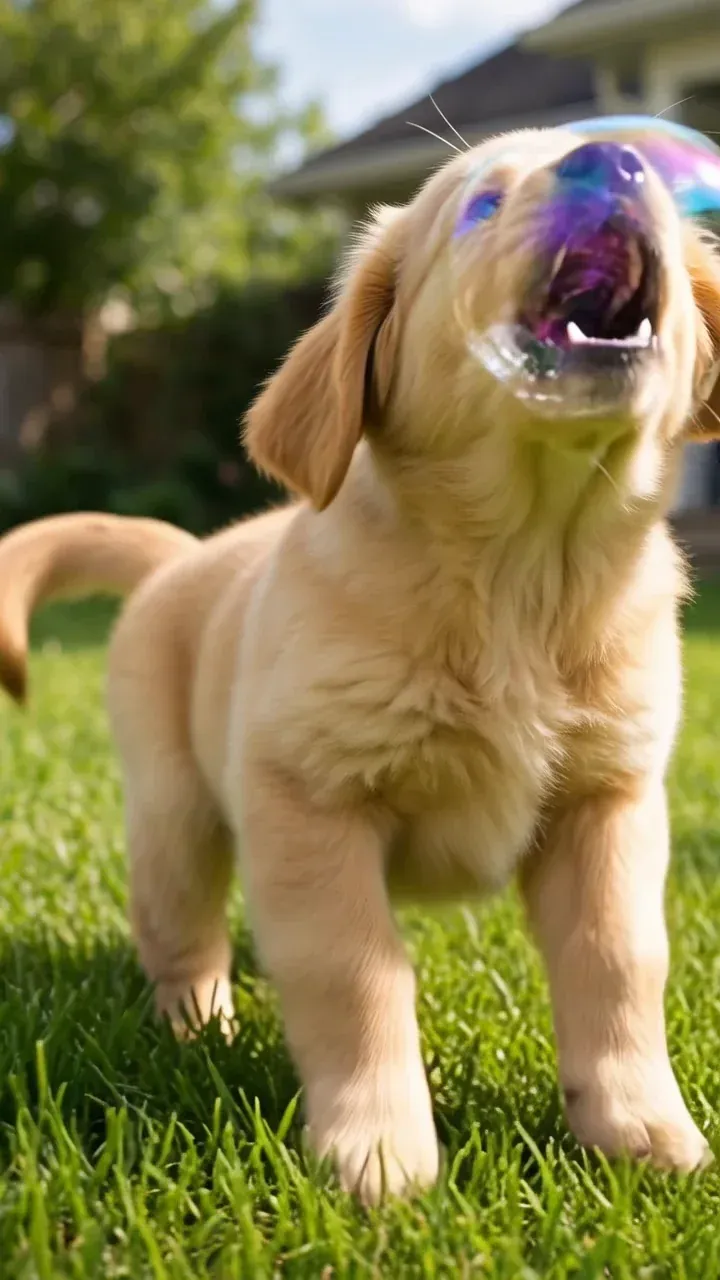
On Omnely, Grok Imagine runs xAI's Grok Imagine Video 1.5: text-to-video and image-to-video with one optional reference image. The frames above come from real Grok Imagine Video 1.5 clips made on Omnely. The current rate is always on the model page: Grok Imagine on Omnely.
Grok Imagine price on Omnely
The Omnely catalog lists Grok Imagine Video 1.5 with these settings:
- Text-to-video and image-to-video, with at most one reference image
- Resolutions of 480p, 720p, and 1080p (720p is the default)
- Durations from 1 to 15 seconds (the default is 8 seconds)
- Several aspect ratios, including 16:9, 9:16, 1:1, 4:3, and 3:4
Here is the current credit rate:
| Resolution | Credits per second |
|---|---|
| 480p | 6 |
| 720p | 6 |
| 1080p | 20 |
- 480p and 720p cost the same per second. For drafts, 720p is the better pick: same rate, sharper output.
- 1080p is a step change. At 20 credits per second it costs about 3.3 times as much per second as 720p.
- The catalog's "from" price is 6 credits, which is one second at 480p.
The formula is the whole pricing model: credits = seconds × rate. An 8-second clip at 720p is 8 × 6, and the same clip at 1080p is 8 × 20.
What a plan's credits buy in seconds of Grok Imagine video
Omnely is an all-in-one workspace for AI models, and its video, image, and chat models need a paid plan. Each plan includes a monthly credit allowance. These are the current plans from the live pricing page:
| Plan | Price | Monthly credits | Seconds at 480p / 720p (÷ 6) | Seconds at 1080p (÷ 20) |
|---|---|---|---|---|
| Starter | $19.99/month | 2,000 | 333 | 100 |
| Pro | $39.99/month | 4,500 | 750 | 225 |
| Creator | $59.99/month | 7,000 | 1,166 | 350 |
The seconds are plain division and assume every credit goes to Grok Imagine video at one resolution; credits spent on other models are not available for video. Dividing a plan's price by its credits gives an effective rate: Starter is $19.99 for 2,000 credits, about 1 cent per credit, so a second of Grok Imagine at 720p works out to roughly 6 cents when the full allowance is used.
Real Grok Imagine clips made on Omnely
Each clip below is a text-to-video render from Grok Imagine Video 1.5 on Omnely at 720p and 9:16, 3 seconds long. The prompt is shown exactly as it was run.
UGC-style product clip
Handheld UGC-style selfie video for TikTok: a young woman in a bright bathroom holds a frosted glass serum bottle up to the camera, taps it twice with her finger and smiles, natural phone-camera look, soft daylightTravel reel
Fast cinematic drone shot rushing low over turquoise water toward a white cliffside village at sunrise, golden light and lens flare, smooth forward motion, travel reelReaction meme
A golden retriever puppy in a sunny backyard chases a floating soap bubble, the bubble pops on its nose, the puppy freezes and stares into the camera with a confused deadpan look, reaction meme moment, shallow depth of fieldShort clips like these are the cheapest way to test a prompt: at 720p the cost is 6 credits for every second rendered.
What changes the credit total
Two settings move the number, and both move it predictably.
1. Duration is a straight multiplier
Credits scale linearly with seconds. Doubling a clip from 4 seconds to 8 doubles the cost. If the final delivery is a 6-second social loop, render 6 seconds instead of 10 "just in case."
2. Resolution has a step at 1080p
The real decision is 720p versus 1080p. Because 1080p is about 3.3 times the per-second rate, it multiplies the whole batch. A common workflow is to iterate at 720p, lock the prompt, then re-render only the keepers at 1080p.
What does not change the rate
- Aspect ratio. The catalog lists the rate by resolution only, so vertical, landscape, and square clips share it.
- Reference image. Image-to-video takes one reference image, and the catalog lists no extra charge for it.
- Prompt length. Longer prompts do not change the credit cost.
How Grok Imagine compares on Omnely
Here is the live per-second rate next to Wan 3.0, another video model in the same workspace:
| Model | 480p | 720p | 1080p | Duration range |
|---|---|---|---|---|
| Grok Imagine Video 1.5 | 6 credits/s | 6 credits/s | 20 credits/s | 1–15 seconds |
| Wan 3.0 | 8 credits/s | 16 credits/s | 32 credits/s | 2–30 seconds |
- At 720p, Grok Imagine costs less than half of Wan 3.0 per second (6 versus 16 credits).
- At 1080p the gap narrows to 20 versus 32 credits per second.
- Rates only tell part of the story. Pick on the look and motion each model gives, and compare the same prompt in both.
Rates for other video models differ again. The Seedance 2.0 price guide covers that model's credit table, and the Kling 3.0 page shows the current rate in the generator. For Grok Imagine workflows, how to use Grok Imagine walks through the settings, Grok Imagine prompts covers prompt patterns, and the Grok video generator guide shows more clips.
How to check the Grok Imagine price before generating
1. Open the generator. Go to the Grok Imagine model page or open the video workspace and pick Grok Imagine.
2. Add a prompt. Optionally attach one reference image for image-to-video.
3. Pick a duration and a resolution. Choose 480p, 720p, or 1080p and a length from 1 to 15 seconds.
4. Read the total before confirming. The credit total for the exact settings appears before the clip is generated. Adjust the resolution or trim a few seconds if the number is higher than planned.
A quick mental check: multiply the seconds by 6 for 480p or 720p, or by 20 for 1080p. If the panel agrees, the settings are right.
Bottom line
The Grok Imagine price on Omnely fits on one line: 6 credits per second at 480p and 720p, 20 credits per second at 1080p, with 1 to 15 second durations and one optional reference image. Draft at 720p, finish the keepers at 1080p, and read the total before generating.
Ready to try it? Open Grok Imagine on Omnely to render a first clip, or browse the video workspace to compare it with other models. Omnely's models need a paid plan, and new users get free credits at sign-up.