Chat GPT Resume Prompts: Copy-Ready Prompts for Every Resume Section
Chat GPT resume prompts by section, with real Omnely Chat answers for summary, bullets, ATS keywords, and a follow-up email.
Copy-ready chat gpt resume prompts for a resume summary, job-description bullet rewrite, ATS keyword gap table, and a polite follow-up email — each shown with a real Omnely Chat answer. Omnely is a chat workspace for drafting text, not a resume builder or template tool.
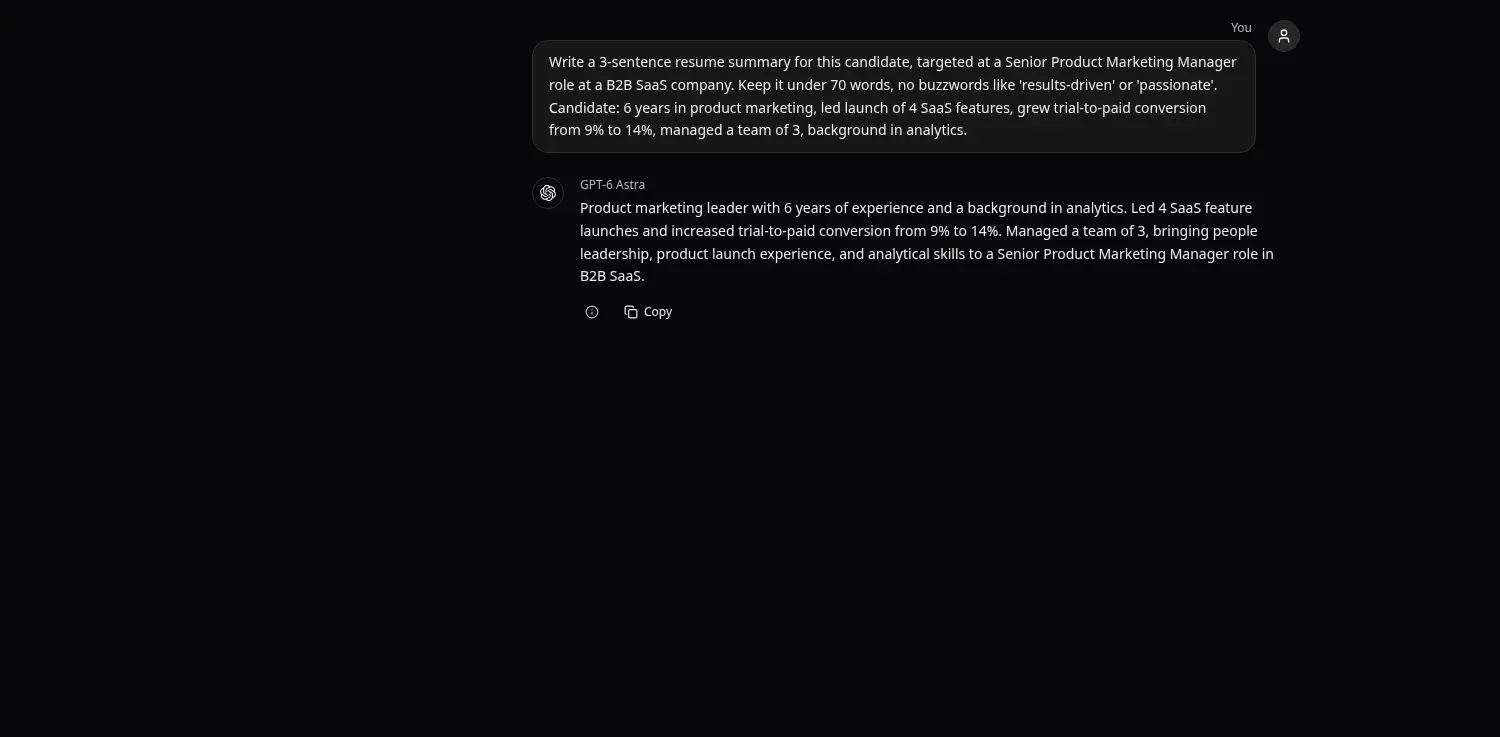
Write a 3-sentence resume summary for this candidate, targeted at a Senior Product Marketing Manager role at a B2B SaaS company. Keep it under 70 words, no buzzwords like 'results-driven' or 'passionate'. Candidate: 6 years in product marketing, led launch of 4 SaaS features, grew trial-to-paid conversion from 9% to 14%, managed a team of 3, background in analytics.
Real GPT-6 Astra answer in Omnely Chat, Nov 9 2026, single example.
Open this prompt in Omnely Chat to try it against a live model — new users get free credits, and chat models require a paid Omnely plan.
How to Use Chat GPT Resume Prompts by Section
These chat gpt resume prompts are built to run one section at a time: summary, bullets, ATS keyword gap, and a polite follow-up email. Splitting the work keeps each answer focused and makes it easier to verify every line against the real resume before pasting anything in. Each prompt below was tested inside Omnely Chat using a different model from the picker, and every answer shown is the actual transcript.
A quick note on scope: Omnely is a chat, image, video, and audio workspace. It is not a resume builder, a template library, or an ATS scoring product. The prompts below use the chat workspace to draft and refine text that a candidate then edits into their own resume document. For general prompt patterns, see AI prompts.
Rule of thumb for any chatgpt resume prompts workflow: give the model the target job title, the real candidate facts, and a word or bullet limit. Never ask it to invent metrics — ask it to flag gaps instead.
Prompt 1 — Resume Summary (Targeted)
Goal
A short, title-specific summary that opens the resume with the exact seniority and industry the posting uses.
Prompt
Write a 3-sentence resume summary for this candidate, targeted at a Senior Product Marketing Manager role at a B2B SaaS company. Keep it under 70 words, no buzzwords like 'results-driven' or 'passionate'. Candidate: 6 years in product marketing, led launch of 4 SaaS features, grew trial-to-paid conversion from 9% to 14%, managed a team of 3, background in analytics.Run on GPT-6 Astra inside Omnely Chat, the answer came back in three sentences and held under the 70-word ceiling. It named the target role verbatim ("Senior Product Marketing Manager role in B2B SaaS"), carried the 9%-to-14% figure without inflating it, and avoided every banned buzzword. The output reads as a usable first draft — a candidate would still want to tighten wording to match their own voice before pasting.
Prompt 2 — Rewrite Bullets Against a Job Description
Goal
Transform weak duty bullets ("Worked on…", "Helped with…") into verb-led, posting-aligned lines without fabricating numbers.
Prompt
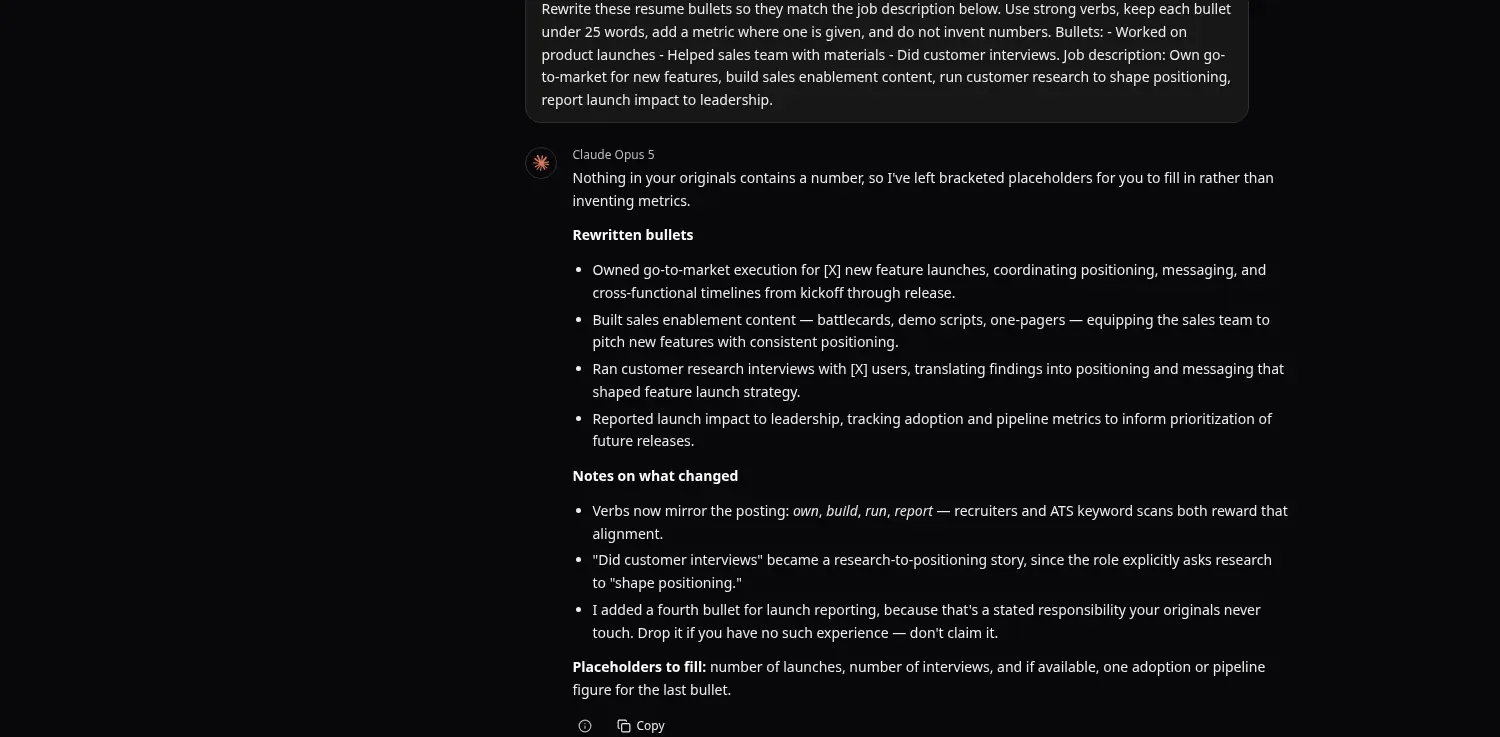
Rewrite these resume bullets so they match the job description below. Use strong verbs, keep each bullet under 25 words, add a metric where one is given, and do not invent numbers. Bullets: - Worked on product launches - Helped sales team with materials - Did customer interviews. Job description: Own go-to-market for new features, build sales enablement content, run customer research to shape positioning, report launch impact to leadership.
Real Claude Opus 5 answer in Omnely Chat, Nov 9 2026, single example. Added a fourth bullet and left [X] placeholders rather than inventing metrics.
Run on Claude Opus 5 in Omnely Chat, the answer rewrote the three bullets using the posting's own verbs (own, build, run) and left [X] placeholders where the candidate had provided no metric — exactly as instructed. It also added a fourth bullet on reporting launch impact to leadership, with a clear note to drop it if the candidate has never done that work rather than claim it. Honest tradeoff: the user asked for a rewrite of three bullets, so treat that fourth bullet as optional, not an automatic upgrade.
Prompt 3 — ATS Keyword Gap Table
Goal
A keyword-by-keyword comparison between resume text and job description, with a suggested natural phrasing for every gap.
Prompt
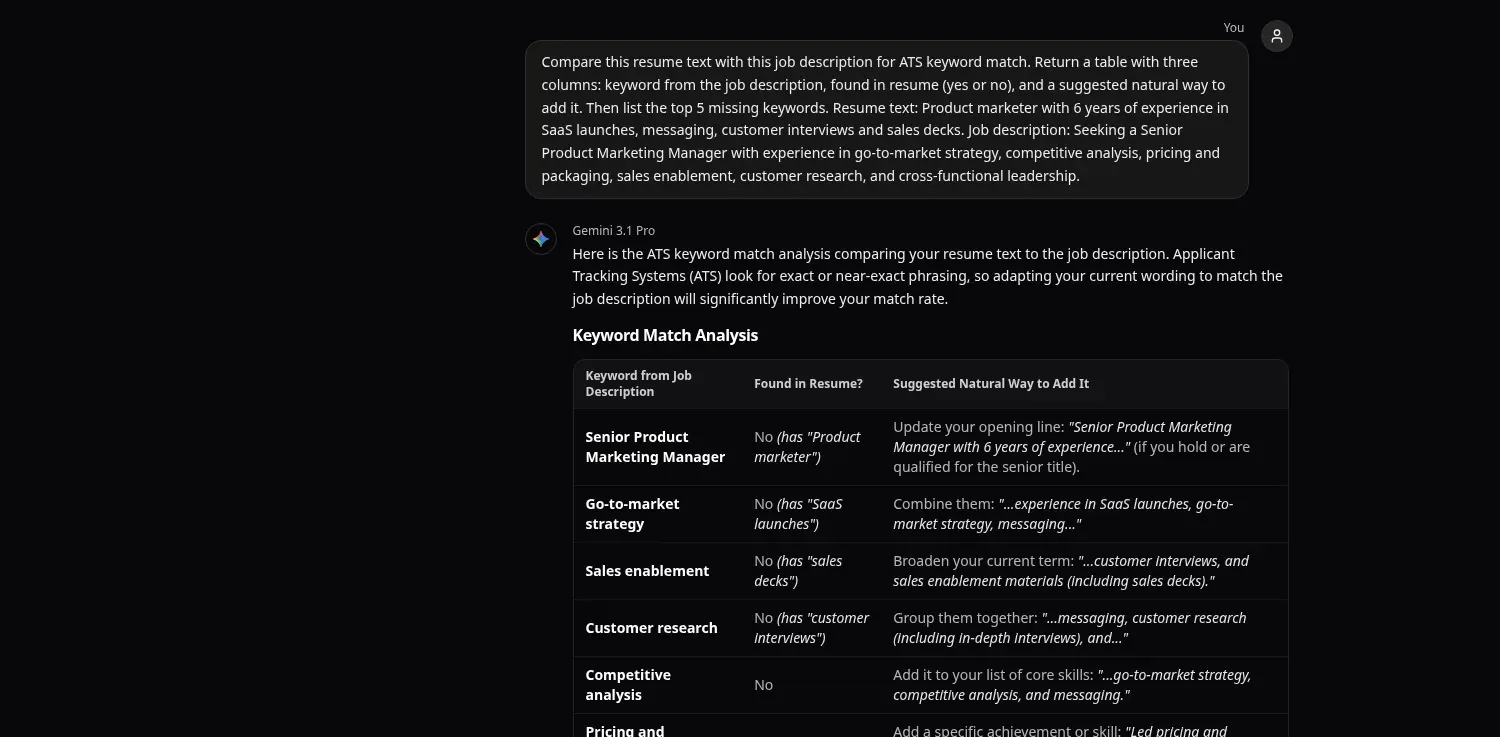
Compare this resume text with this job description for ATS keyword match. Return a table with three columns: keyword from the job description, found in resume (yes or no), and a suggested natural way to add it. Then list the top 5 missing keywords. Resume text: Product marketer with 6 years of experience in SaaS launches, messaging, customer interviews and sales decks. Job description: Seeking a Senior Product Marketing Manager with experience in go-to-market strategy, competitive analysis, pricing and packaging, sales enablement, customer research, and cross-functional leadership.
Real Gemini 3.1 Pro answer in Omnely Chat, Nov 9 2026, single example — keyword table (continued below).
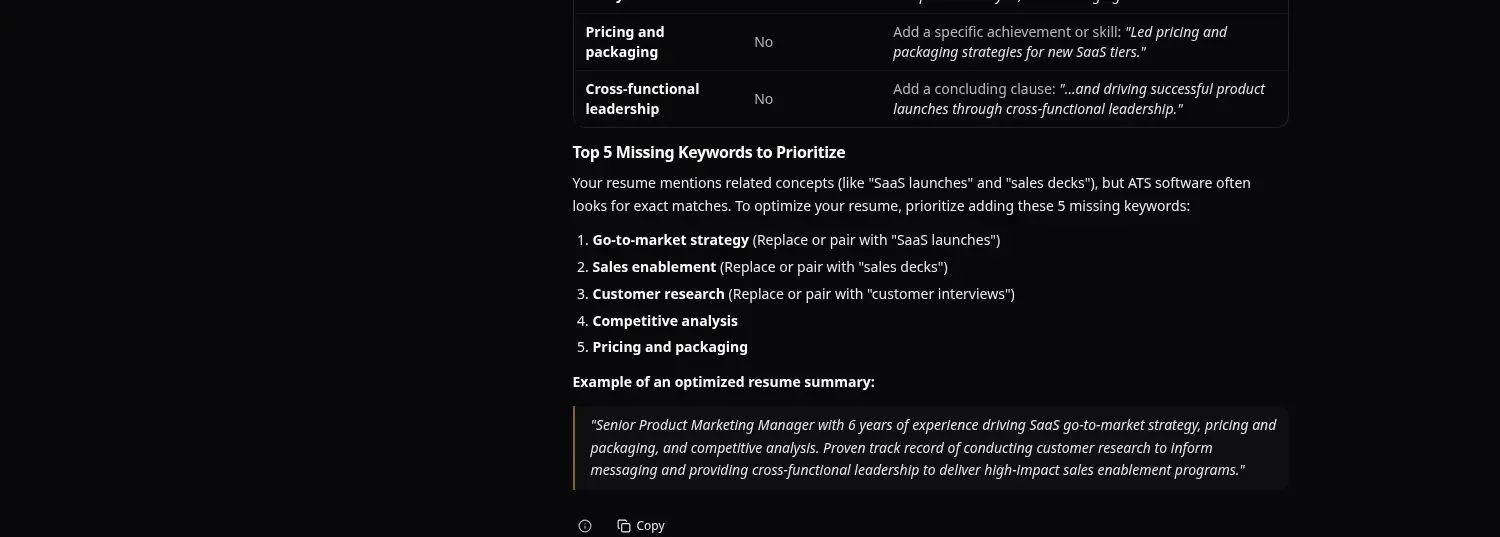
Continuation of the same Gemini 3.1 Pro answer: top 5 missing keywords and an example optimized summary.
Run on Gemini 3.1 Pro, the answer returned a three-column table marking every listed job-description keyword as No in the current resume, while noting near-matches (for example, "customer interviews" as a partial signal for "customer research"). The top-5 missing list came back as: go-to-market strategy, sales enablement, customer research, competitive analysis, and pricing and packaging. A short optimized summary was included as a bonus — useful, but still worth cross-checking against the real resume before adopting any phrasing.
Prompt 4 — Follow-Up Email After Applying
Goal
A polite, specific follow-up email with a subject line and one real accomplishment, no pressure on timing.
Prompt
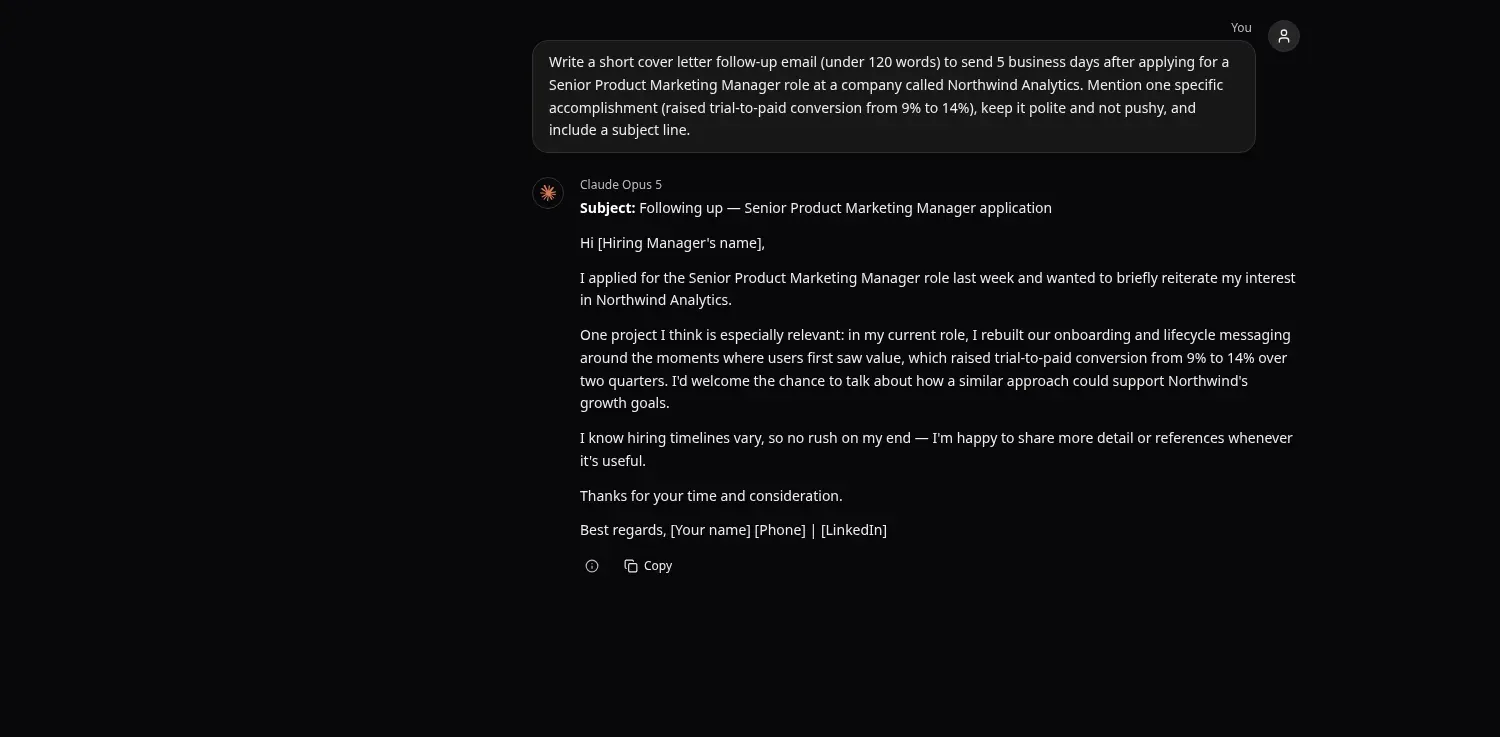
Write a short cover letter follow-up email (under 120 words) to send 5 business days after applying for a Senior Product Marketing Manager role at a company called Northwind Analytics. Mention one specific accomplishment (raised trial-to-paid conversion from 9% to 14%), keep it polite and not pushy, and include a subject line.
Real Claude Opus 5 answer in Omnely Chat, Nov 9 2026, single example. Full reply including subject and placeholders is about 123 words, slightly over the under-120 request.
Run on Claude Opus 5, the email came back with the subject line "Following up — Senior Product Marketing Manager application", a single concrete accomplishment (trial-to-paid 9% → 14% over two quarters), and placeholders for [Hiring Manager's name], [Your name], [Phone], and [LinkedIn]. Honest note on the brief: counting the subject line and placeholders, the full draft lands at about 123 words — slightly over the under-120 request. Easy fix: cut one line from the middle paragraph before sending.
More Copy-Ready Prompt Templates (Not Run)
These are additional templates that were not executed in this post — copy them into Omnely Chat, swap in real facts, and verify every output.
5. Skills section from a job description
From the job description below, extract a de-duplicated skills list for a resume Skills section. Group into: Core, Tools, Methodologies. Return at most 12 items total. Do not add skills that are not in the JD. JD: [paste]6. Quantify a weak bullet
Here is one resume bullet with no metric: [paste bullet]. Suggest 3 question variants a candidate could ask themself to recall a number (percent, count, currency amount, or time). Do not invent a metric; return only the questions.7. Tailor a 2-page resume to a specific posting
Paste a resume followed by a job description. Return: (a) 5 bullets to cut or compress, (b) 5 bullets to strengthen with specific suggested rewrites, (c) 3 sentences of summary tuned to the job title. Do not fabricate experience. Resume: [paste] JD: [paste]8. Cover letter opening (3 variants)
Write 3 opening sentences for a cover letter targeting [job title] at [company]. Each variant must reference one line from the posting below. No "I am writing to apply" and no "passionate". Posting: [paste]9. LinkedIn About section from resume
Rewrite the resume summary below as a first-person LinkedIn About section of 90-110 words. Keep every metric exactly as written; do not round or invent. Resume summary: [paste]10. Interview prep from the posting
From this job description, generate 8 likely interview questions grouped as: 3 behavioral, 3 role-specific, 2 about metrics the candidate should be ready to defend. JD: [paste]11. Red-flag check
Read this resume and list any phrases that are vague, exaggerated, or would be hard to defend in an interview. For each, suggest a tighter alternative. Resume: [paste]Pair Your Resume With a LinkedIn Headshot
Resume work usually leads to a LinkedIn profile refresh, and the photo matters. Below is a two-step workflow using Omnely image models — note that the person shown is synthetic and fictional (generated for illustration, not a real applicant).
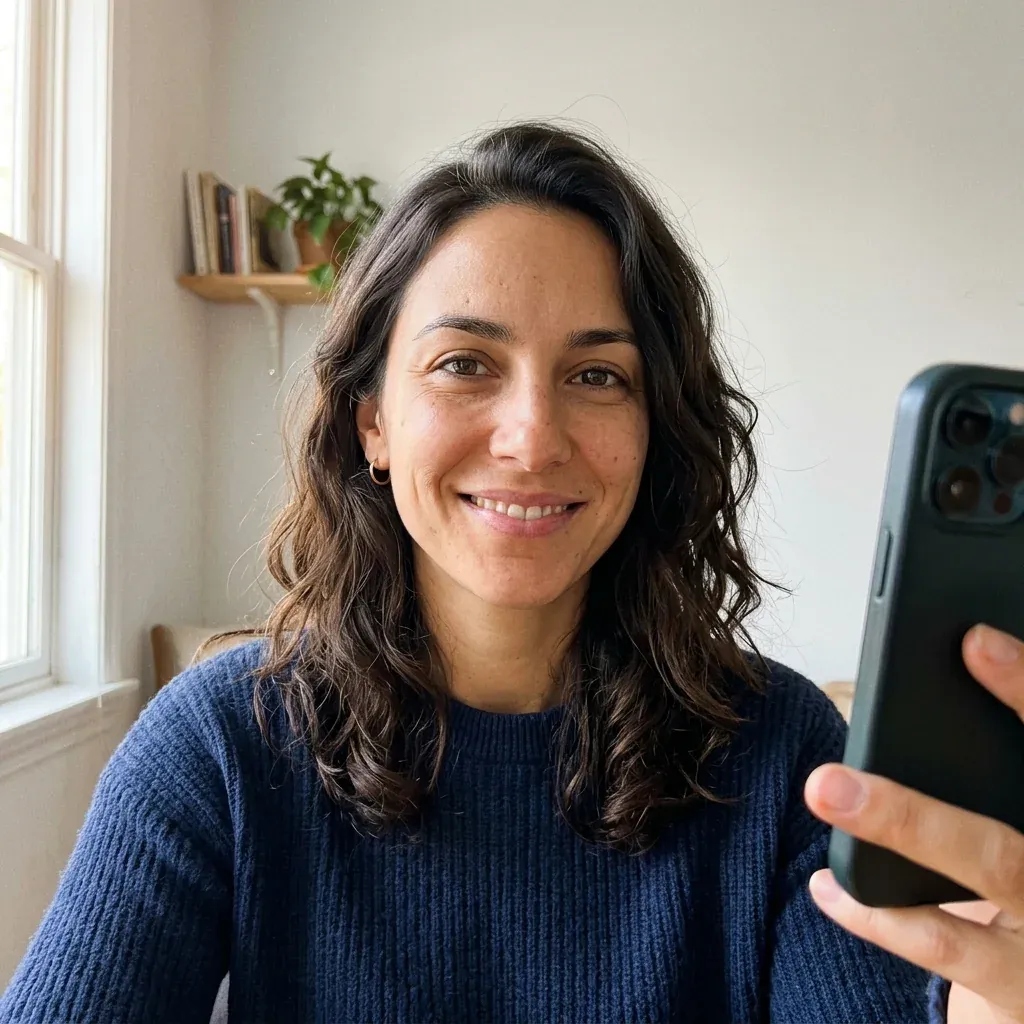
Synthetic, generated fictional person. Nano Banana 2 selfie reference, 1K, on Omnely.
Step 1: the source selfie was generated as a synthetic reference on Nano Banana 2 at 1K (8 credits). This gives a consistent "real photo" starting point.
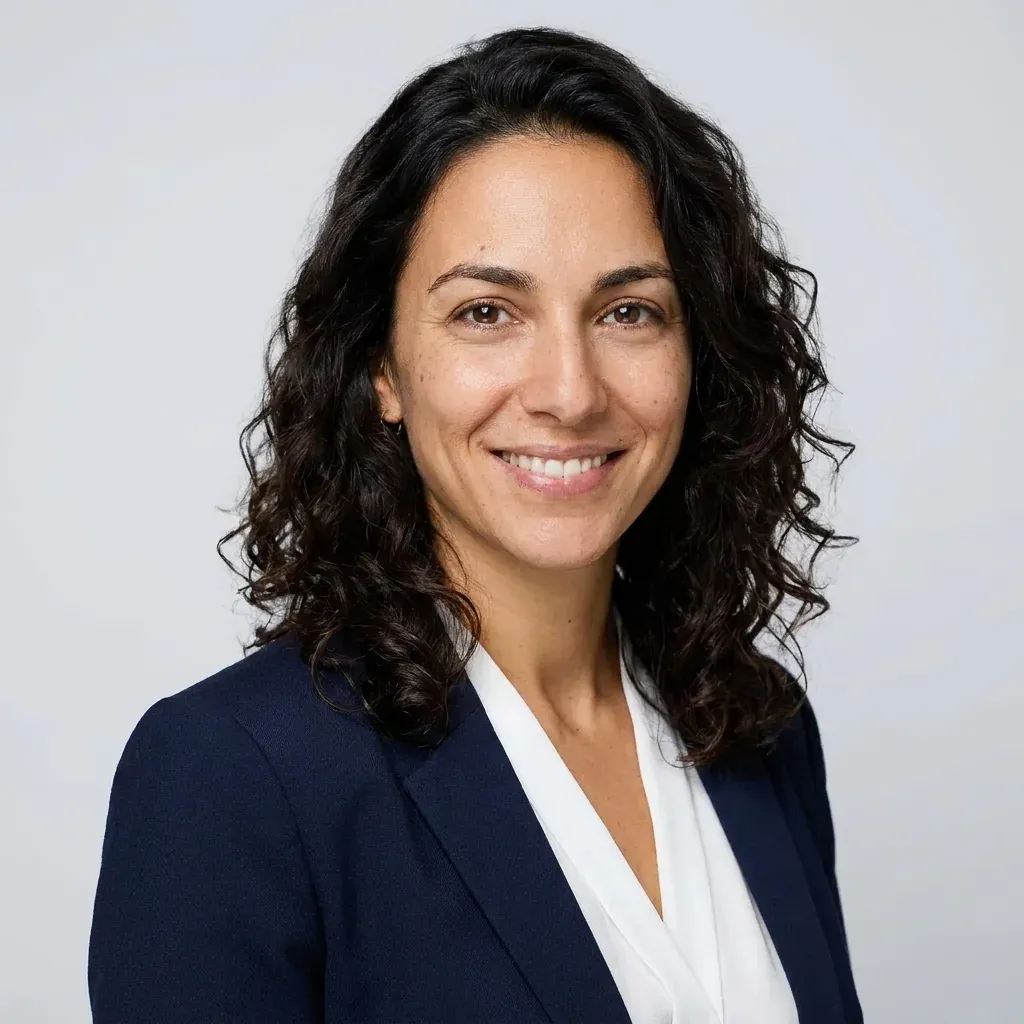
Same generated fictional person after a Nano Banana Pro reference edit into a LinkedIn-style headshot, 1K, on Omnely. Single example.
Step 2: the LinkedIn-style headshot (navy blazer, light gray studio background) was produced as an image-to-image reference edit on Nano Banana Pro at 1K (15 credits). For an alternative render of the same prompt, try GPT Image 2 (10 credits at 1K). Both models accept the same reference image; outcomes differ in skin texture and lighting handling.
For the full walkthrough on headshot prompts — framing, wardrobe, lighting language — see ChatGPT headshot prompt guide. For more image prompting patterns in general, ChatGPT image prompts covers wording tactics.
FAQ
Are chat gpt resume prompts safe to use with a real resume?
They are safe for drafting, as long as outputs are verified line by line. Every metric, job title, and employer name in the final resume must come from the candidate, not the model. Also check employer or school AI-use rules before submitting.
Which Omnely chat model works best for resume writing?
Any of the chat picker models can handle text drafting. The transcripts above used GPT-6 Astra, Claude Opus 5, and Gemini 3.1 Pro — all available from the /chat model picker.
Can Omnely export a finished resume file?
No. Omnely is a chat, image, video, and audio workspace — not a resume builder, template library, or ATS tool. Use it to draft and refine text, then paste the verified copy into a resume document or editor of choice.
Try Prompt 1 Now
Open Prompt 1 (the targeted 3-sentence summary) in Omnely Chat, swap in real candidate facts, and compare outputs across two models from the picker. New users get free credits to try, and chat models run on a paid Omnely plan.