Prompts for Gemini AI: Copy-Ready Chat and Image Prompts With Real Results
Prompts for Gemini AI: copy-ready chat prompts for Gemini 3.1 Pro and Gemini 3.6 Flash plus Nano Banana 2 image prompts, each with real Omnely results.
Good prompts for Gemini AI follow a simple shape: a clear task, enough context, a format, and a few limits. This post gives copy-ready chat prompts for Gemini 3.1 Pro and Gemini 3.6 Flash (writing, research, coding) plus image prompts for Nano Banana 2, Google's Gemini image model, each shown with a real Omnely result so the structure is easy to copy and adapt.
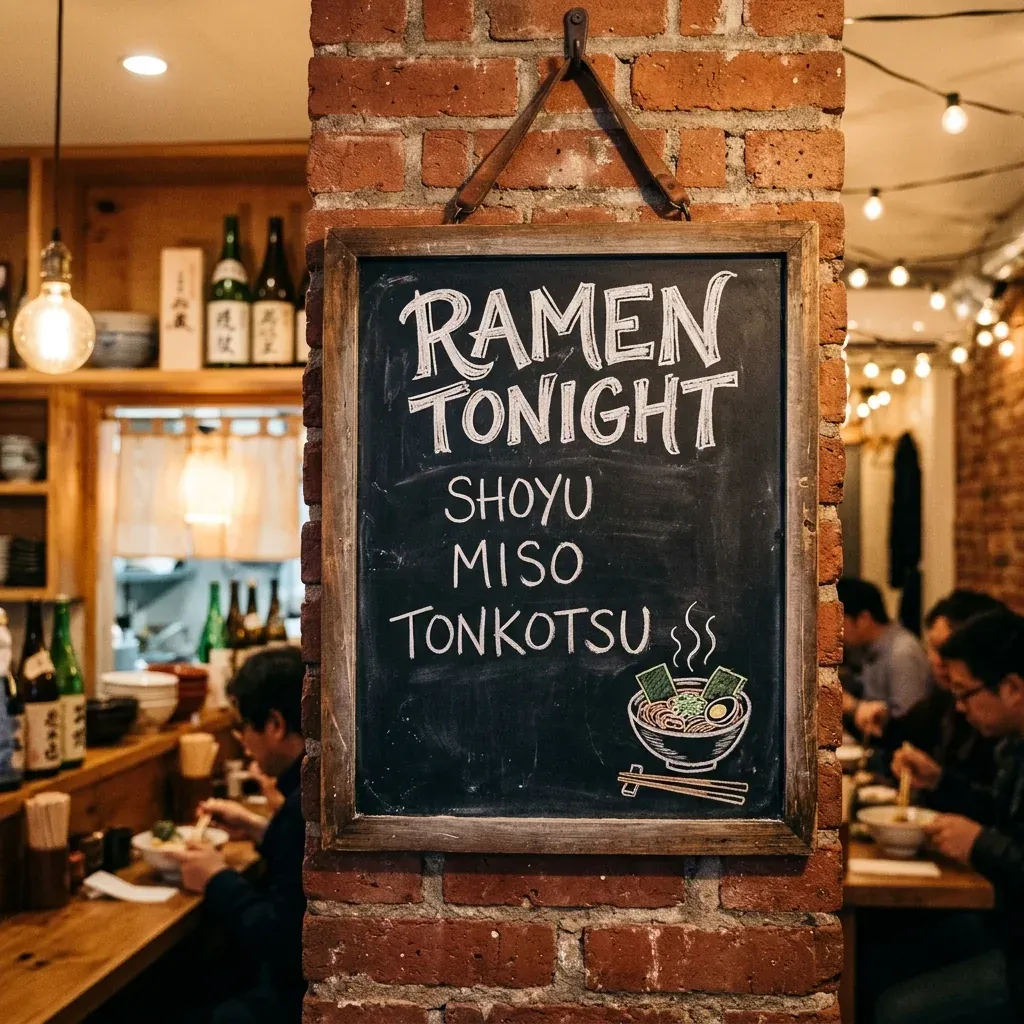
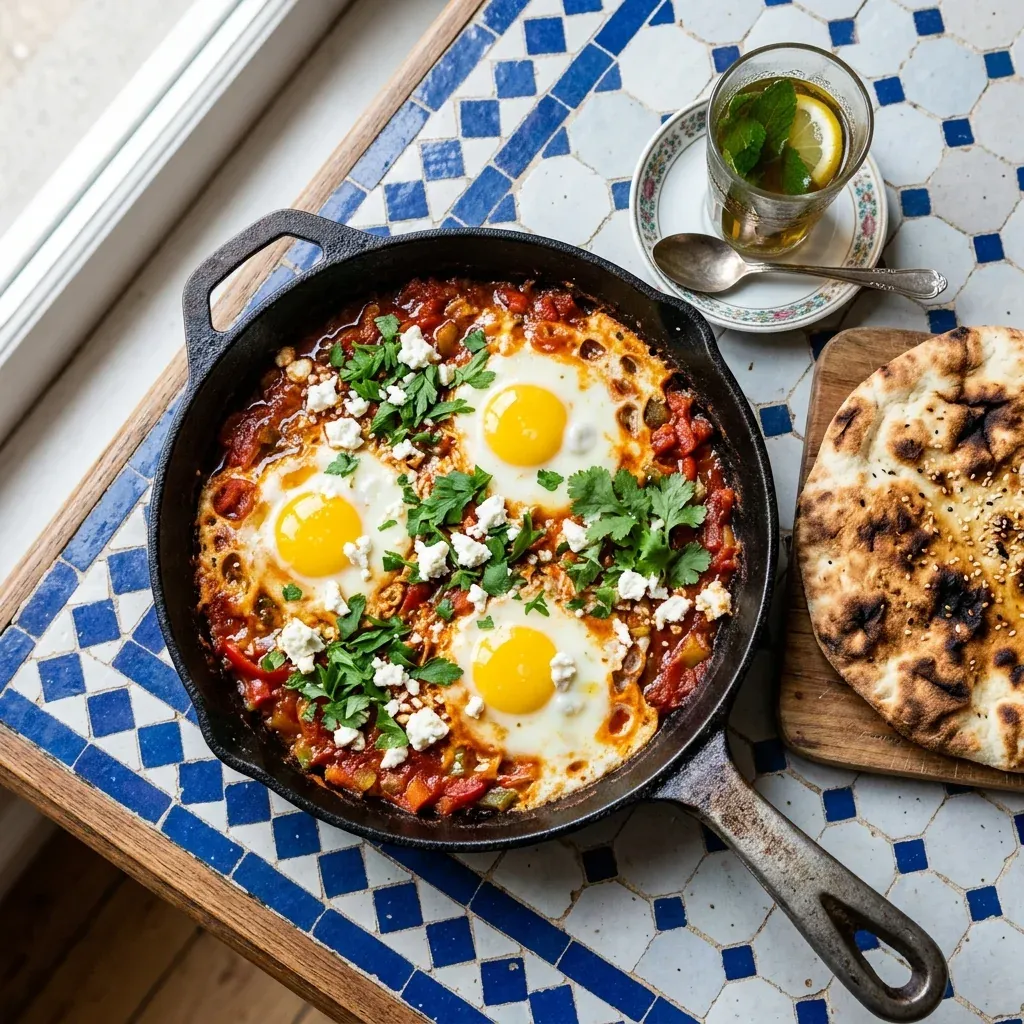
Prompt 1, run on Nano Banana 2 and Nano Banana Pro:
Square photo of a hand-lettered chalkboard menu hanging on a brick wall in a small ramen bar, white chalk headline reads "RAMEN TONIGHT" and three lines below read "SHOYU", "MISO", "TONKOTSU", a small chalk drawing of a steaming bowl in the corner, warm tungsten light, photorealistic, spelling exactly as written
Prompt 1 on Nano Banana 2, 1:1, 1K, 8 credits, single example (real Omnely output).
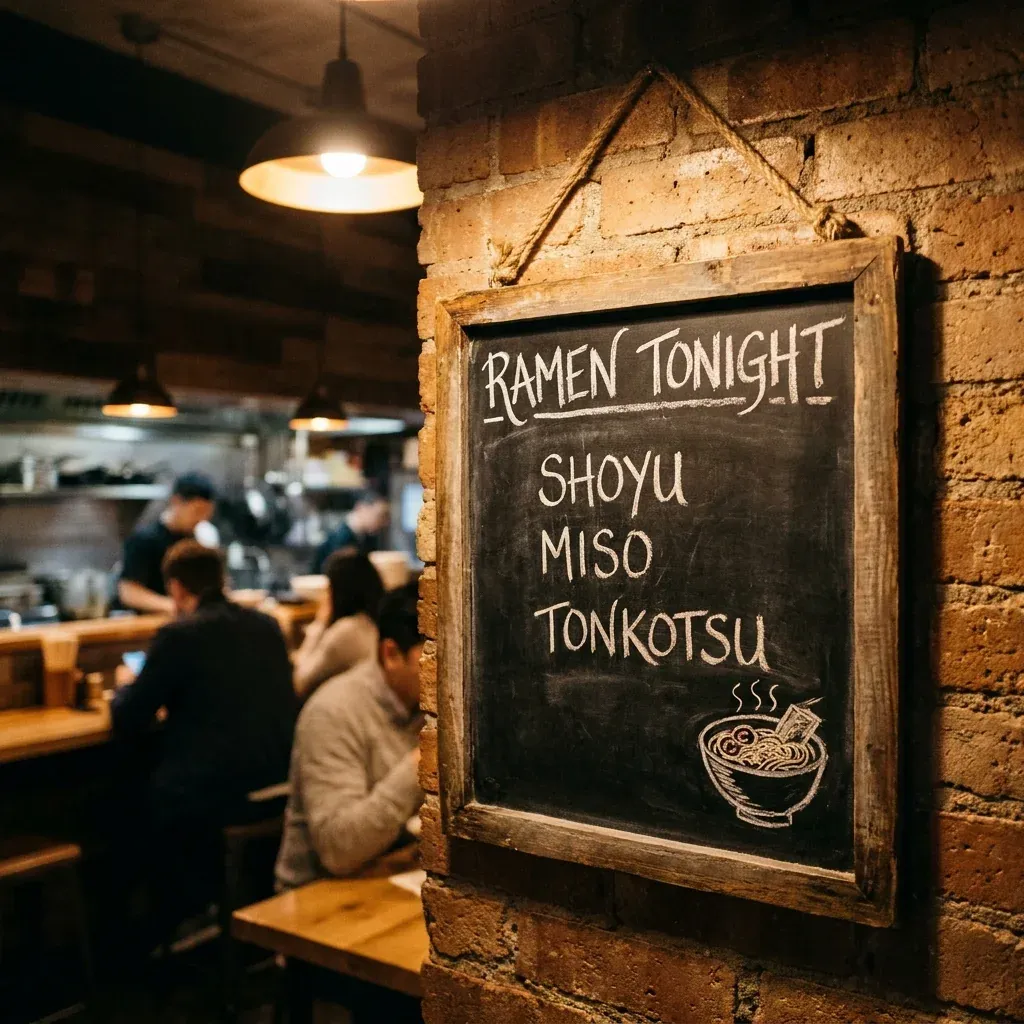
Prompt 1 on Nano Banana Pro, 1:1, 1K, 15 credits, single example (real Omnely output).
What the outputs show: On Nano Banana 2, the chalkboard sits in a frame hung on brick inside a busy ramen bar with string lights and blurred diners behind. The chalk reads RAMEN TONIGHT, SHOYU, MISO, TONKOTSU, all spelled correctly in this run, with a small chalk bowl and steam in the bottom right. On Nano Banana Pro, the same prompt produced a similar chalkboard in a rustic wooden frame hung on brick by a rope, pendant lamp and diners behind, the same four words spelled correctly, and the bowl drawing in the bottom right. These are single examples, one run each, not a verdict.
Try these on Omnely Chat, Nano Banana 2 and Nano Banana Pro.
How to write prompts for Gemini AI
Google's Gemini prompting guidance and the Gemini API prompt design page both land on the same formula: write a clear task, give the model enough context, say what format you want back, and set the limits. Guides from AI Agents Library, ClickUp and Phrasly repeat the same four parts with different labels. Persona (telling the model to act as a specific role) is the debatable part. ClickUp's Gemini post flags it as sometimes useful and sometimes noise. Treat it as optional.
Two extra ideas from the API page matter. Use consistent structure (same headings or labels each time) and, when the prompt gets long, put the long context first and the question at the end.
| Part | What to write | Example |
|---|---|---|
| Task | The verb and the deliverable | "Rewrite this product description" |
| Context | The facts the model needs | Materials, size, audience, constraints |
| Format | Shape of the output | "Two versions, under 60 words each" |
| Limits | What to keep or avoid | "Keep every fact", "no jargon" |
| Persona (optional) | A role, used sparingly | "As a copy editor for a small shop" |
A blank chat template to adapt:
Task: [what you want done]
Context: [facts, audience, constraints, any text to work from]
Format: [structure of the answer, length, sections, table or list]
Limits: [must keep, must avoid, tone, reading level]
Full sentences work better than keyword lists, and follow-up messages beat long one-shot prompts when the task is open-ended. If the prompt pastes in a document, article or dataset, drop it in first and ask the question in the last line.
Gemini chat prompts in Omnely
The Omnely chat picker lists four Gemini chat models: Gemini 3.1 Pro, Gemini 3.6 Flash, Gemini 3.5 Flash and Gemini 2.5 Pro. The prompts below use Gemini 3.6 Flash and Gemini 3.1 Pro. A few Gemini features belong to Google's own apps, not Omnely: Deep Research, Gems, @Gmail or @Drive or @Calendar mentions, Gemini inside Docs and Sheets, Flash-Lite and Deep Think. The three prompts below each use the task, context, format, limits shape so the structure is easy to copy. The screenshots under each prompt show the model's real answer in Omnely Chat, each a single example.
1. Writing prompt (Gemini 3.6 Flash)
Built this way because the task has a fixed deliverable (a rewrite), a bounded set of facts to keep, two output variants, and a word cap.
Rewrite this product description for a small handmade ceramics shop so it sounds warmer and stays under 60 words. Keep every fact: stoneware mug, dishwasher safe, holds 350 ml, made in small batches, each glaze varies slightly. Give two versions: one playful, one calm.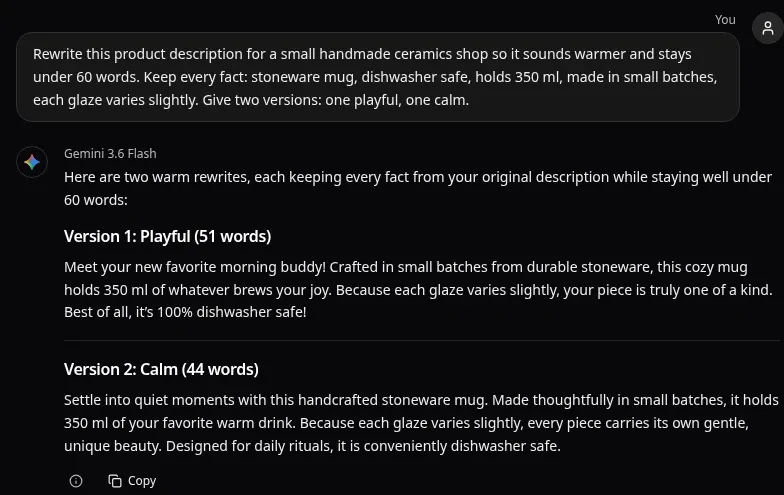
Real Gemini 3.6 Flash answer in Omnely Chat, Nov 3 2026, single example.
What the answer shows: two rewrites, playful and calm, both keeping stoneware, dishwasher safe, 350 ml, small batches and the glaze note, and both under 60 words. The word counts the model printed are off: the playful version is 44 words, not the 51 it claims, and the calm one is 45, not 44. The playful version also adds "100%" to dishwasher safe, which the original did not say.
2. Research prompt (Gemini 3.1 Pro)
Built this way because the task asks for a structured compare-and-contrast with named columns, follow-up open questions, and an uncertainty flag.
Summarize the main arguments for and against a four-day work week. Format: a table with the columns Point, Case for, Case against, Evidence that would settle it. Then list three open questions where the research is still thin. Flag anything uncertain instead of guessing.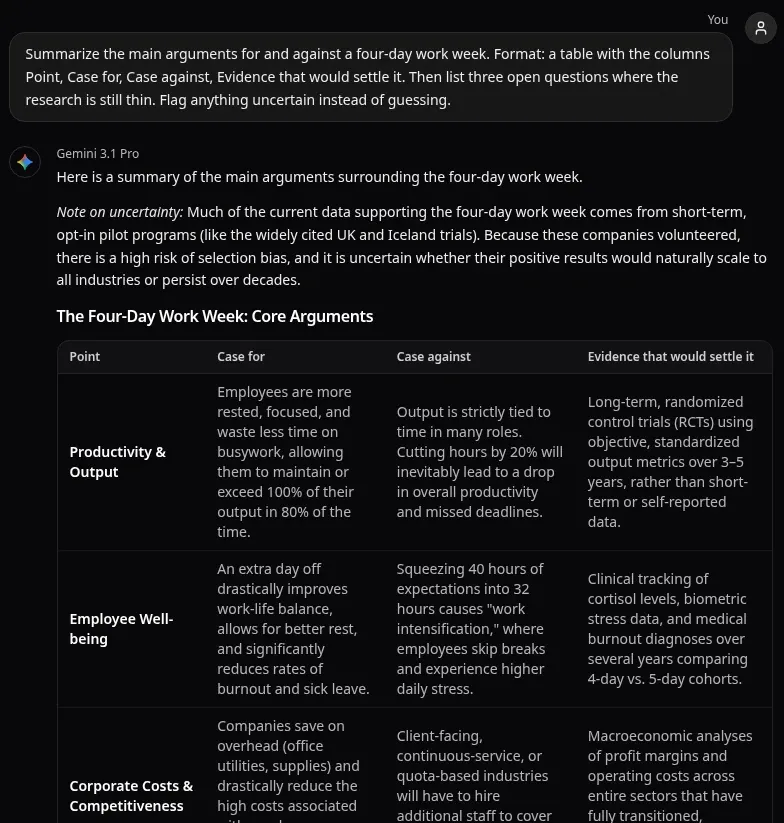
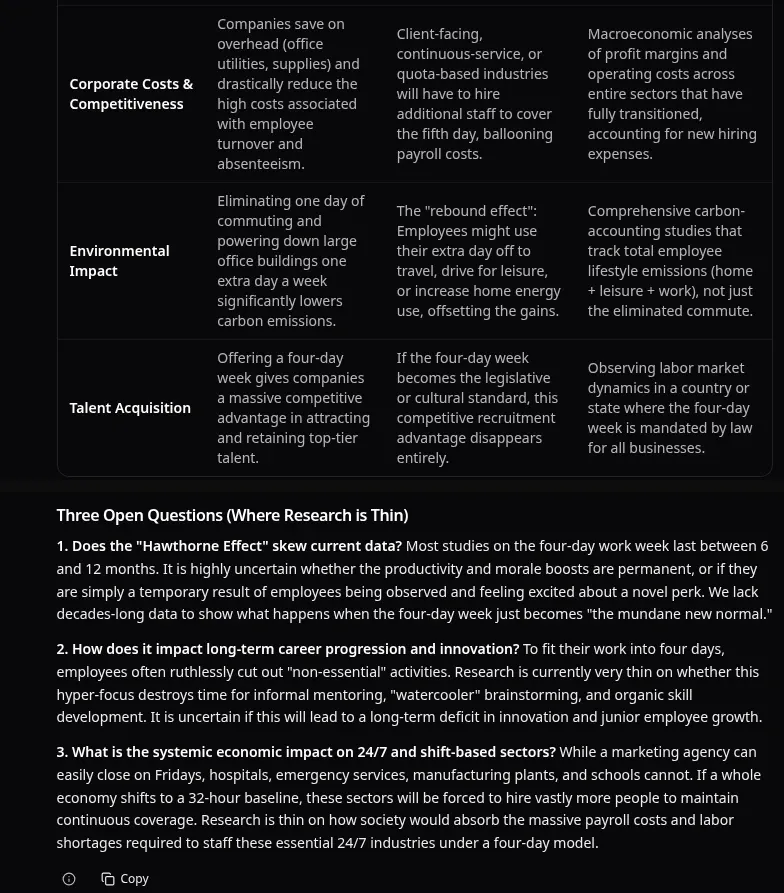
Real Gemini 3.1 Pro answer in Omnely Chat, Nov 3 2026, shown in two parts, single example.
What the answer shows: an uncertainty note up front (opt-in pilots, selection bias), a table with exactly the four requested columns across five points, and three open questions. The claims are not sourced or linked, so treat them as a starting map to check, not as research findings.
3. Coding prompt (Gemini 3.1 Pro)
Built this way because the task fully specifies the signature, the input shape, the edge cases, the tests expected, and asks for a single sentence on complexity. Tight specs give the model less room to drift.
Write a Python function longest_streak(dates: list[str]) -> int that takes dates as YYYY-MM-DD strings (unsorted, may contain duplicates) and returns the longest run of consecutive calendar days. Include type hints, three assert tests including an empty list, and one sentence on the time complexity.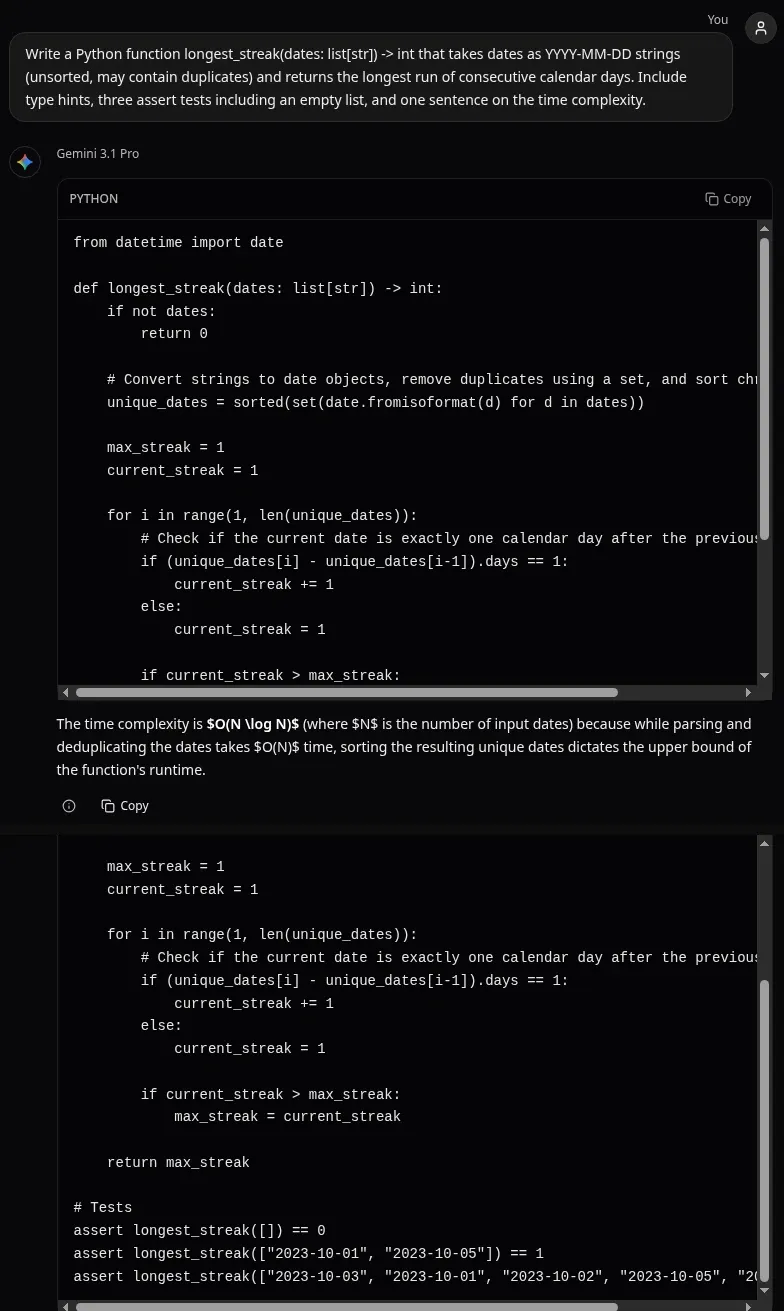
Real Gemini 3.1 Pro answer in Omnely Chat, Nov 3 2026, shown in two parts of the same code block, single example.
What the answer shows: a typed function that deduplicates with a set, sorts the dates and counts consecutive days, three assert tests including the empty list, and an O(N log N) complexity sentence. Run as written, all three asserts pass. The complexity sentence shows raw LaTeX markup in the chat window, and the third assert line runs past the code box width, so scroll the box or copy the code to read it.
For a side-by-side look at how Gemini compares to other chat models, see Gemini vs ChatGPT.
Nano Banana 2 image prompts
Nano Banana 2 is Google's Gemini 3.1 Flash Image model and Nano Banana Pro is Gemini 3 Pro Image. The same prompt shape works on both. A reusable image template:
Subject: [who or what, with specifics]
Setting: [where, time of day, surfaces, props]
Light: [direction, quality, warm or cool]
Camera or style: [photo, lens look, illustration style, aspect ratio]
Text: [any words to render, in quotes, exact spelling]
Exclusions: [no text, no logo, no extra people, etc.]
Prompt 1 is at the top of this post, run on both Nano Banana 2 and Nano Banana Pro so the difference in a single pair of runs is visible. The next four prompts run on Nano Banana 2 at 1K.
Prompt 2: Product shot
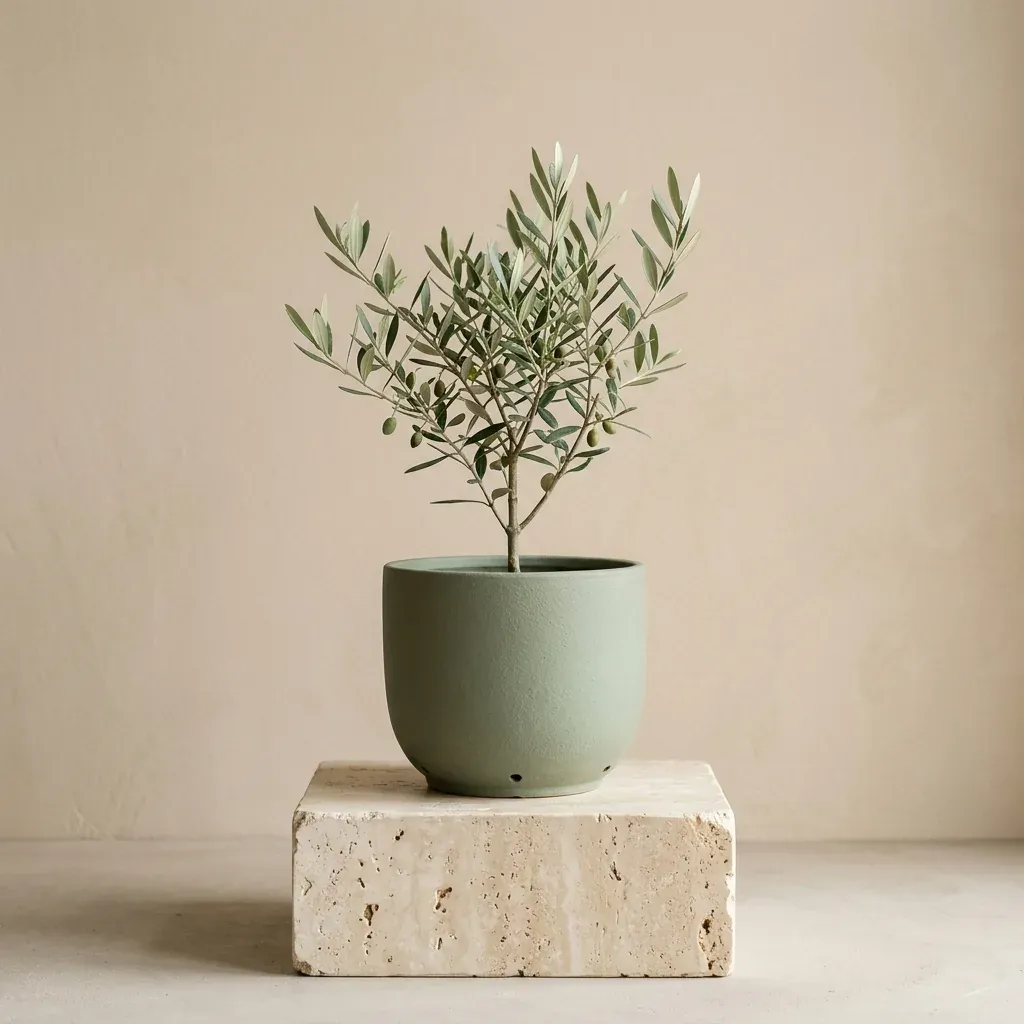
Square product photo of a matte sage-green ceramic planter with a small olive tree on a travertine stone plinth, plain warm beige wall behind, soft diffused daylight from the right, gentle shadow, minimal catalog style, no text, no logo
Nano Banana 2, 1:1, 1K, 8 credits, single example.
What the output shows: A matte sage-green planter holds a small olive tree on a rough travertine block against a plain beige wall, with soft light from the right and a minimal catalog look. Single example, one run.
Prompt 3: Portrait of a generated person
Portrait photo of a generated, fictional elderly fisherman with a white beard and a navy knit cap mending an orange fishing net on a harbor wall at golden hour, weathered hands in focus, boats softly blurred behind, 85mm lens look, natural skin texture, photorealistic, no text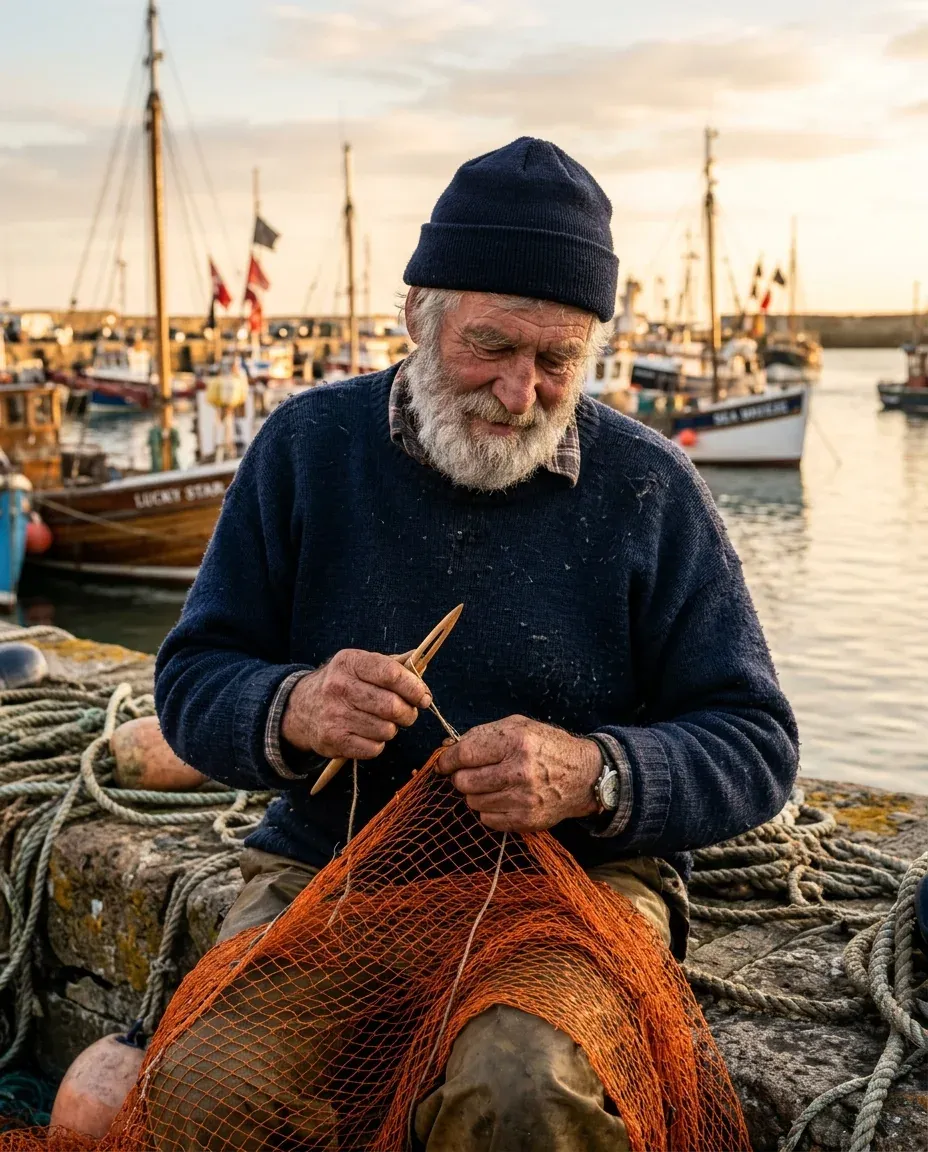
Generated, fictional person (not a real individual). Nano Banana 2, 4:5, 1K, 8 credits, single example.
What the output shows: The man in the frame is a generated, fictional elderly fisherman, not a real person: white beard and navy knit cap, mending an orange net with a wooden net needle on a stone harbor wall with coiled ropes, fishing boats and masts behind in golden light. Small lettering appeared on a boat hull in the background even though the prompt said no text, which is a useful reminder that exclusions sometimes slip through on busy scenes. Single example, one run.
Prompt 4: Isometric illustration
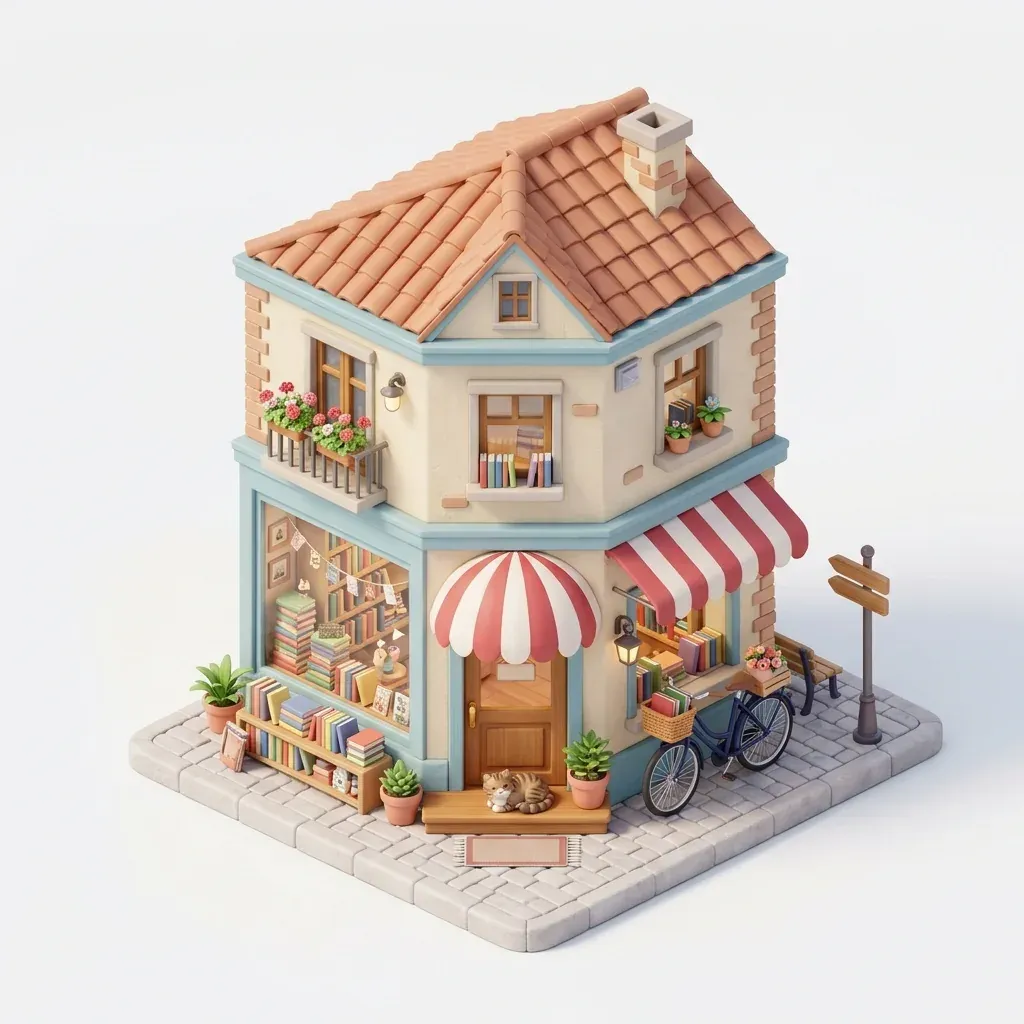
Isometric 3D illustration of a tiny two-story corner bookshop with a striped awning, stacks of books in the window, a bicycle parked outside and a cat on the doorstep, soft pastel colors, clean white background, toy-like miniature style, no text
Nano Banana 2, 1:1, 1K, 8 credits, single example.
What the output shows: A two-story isometric corner bookshop with red and white striped awnings, stacked books in the windows, potted plants, a blue bicycle with a basket parked at the side, and a tabby cat lying on the doorstep, rendered on a white background in a toy-like pastel style. Single example, one run.
Prompt 5: Overhead food photo
Overhead square food photo of shakshuka in a black cast-iron pan with three eggs, crumbled feta and parsley, on a table of blue and white zellige tiles, a piece of round flatbread and a small glass of mint tea beside it, natural window light, photorealistic, no text, no logo
Nano Banana 2, 1:1, 1K, 8 credits, single example.
What the output shows: Overhead shakshuka in a black cast-iron pan with three eggs, feta and parsley sits on blue and white zellige tiles, with a charred round flatbread on a wooden board and a glass of mint tea with a spoon beside it, lit by window light from the left. Single example, one run.
More image prompts on both models live in the Nano Banana prompt post.
Credits and settings
Image credits for the two Gemini image models on Omnely:
| Model | 1K | 2K | 4K | Max references | Aspect ratios |
|---|---|---|---|---|---|
| Nano Banana 2 | 8 | 12 | 15 | 8 | 1:1, 16:9, 9:16, 4:3, 3:4, 21:9, 3:2, 2:3, 5:4, 4:5 |
| Nano Banana Pro | 15 | 15 | 20 | 14 | 1:1, 16:9, 9:16, 4:3, 3:4, 21:9, 3:2, 2:3, 5:4, 4:5 |
Chat credit use is not listed here.
Fixes when a Gemini prompt misses
- Try moving long context to the top and putting the question on the last line, as the Gemini API prompt design page recommends.
- Try naming the format in full (table columns, bullet count, word cap) instead of "nicely formatted".
- Try adding what to avoid, not just what to include. "No bullet points", "no text in the image", "do not invent sources".
- Try splitting a long prompt into two turns: first ask the model to restate the brief, then ask for the output.
- Try the other Gemini model: Flash for short rewrites and quick drafts, Pro for reasoning, longer context and code.
FAQ
Which Gemini models are on Omnely?
The /chat picker lists Gemini 3.1 Pro, Gemini 3.6 Flash, Gemini 3.5 Flash and Gemini 2.5 Pro. On the image side, Nano Banana 2 is Gemini 3.1 Flash Image and Nano Banana Pro is Gemini 3 Pro Image. For how Gemini stacks up against Anthropic's models, see Claude vs Gemini.
Can Gemini in Omnely read Gmail or Drive?
No. Gmail, Drive and Calendar mentions, Gemini inside Docs and Sheets, Deep Research, Gems and Deep Think are features of Google's own apps and account, not Omnely. Omnely Chat runs the Gemini models themselves, without those Google account connections.
How many credits does a Nano Banana 2 image use?
Nano Banana 2 costs 8 credits at 1K, 12 at 2K and 15 at 4K, with up to 8 reference images per generation.
Do Gemini models on Omnely need a paid plan?
New users get free credits on sign-up to try the platform. The chat and image models themselves need a paid Omnely plan.
Copy any prompt above, open Omnely Chat or Nano Banana 2, paste it in, and adjust the task, context, format and limits lines until the output lands where it should.