How to Use Claude: A Step-by-Step Guide to Claude AI Chat
How to use Claude well: pick the right model, write clear prompts, add files, and see four real Claude Opus 5.5 answers from Omnely chat you can rerun.

How to use Claude in plain terms: pick a Claude model, write a clear task with the context and format you want, attach any files, then iterate with short follow-ups like "shorter" or "give two more options." The examples below are real Claude Opus 5.5 answers captured in Omnely chat, so every prompt can be copied and rerun.
Quick start
| Task | What to type | Claude model in Omnely |
|---|---|---|
| Summarize something | "Summarize X in 5 bullets for a [audience]." | Claude Opus 5.5 |
| Rewrite a message | "Rewrite this to sound friendly but firm." | Claude Sonnet 5 |
| Write code | "Write a Python function that… then explain in 3 sentences." | Claude Opus 5.5 |
| Make a plan or table | "Make a 7-day plan as a simple table." | Claude Sonnet 5 |
| Analyze a PDF or image | Attach the file. "Extract the table on page 3." | Claude Opus 5.5 |
Paste this prompt into Omnely chat with Claude Opus 5.5 selected in the model picker:
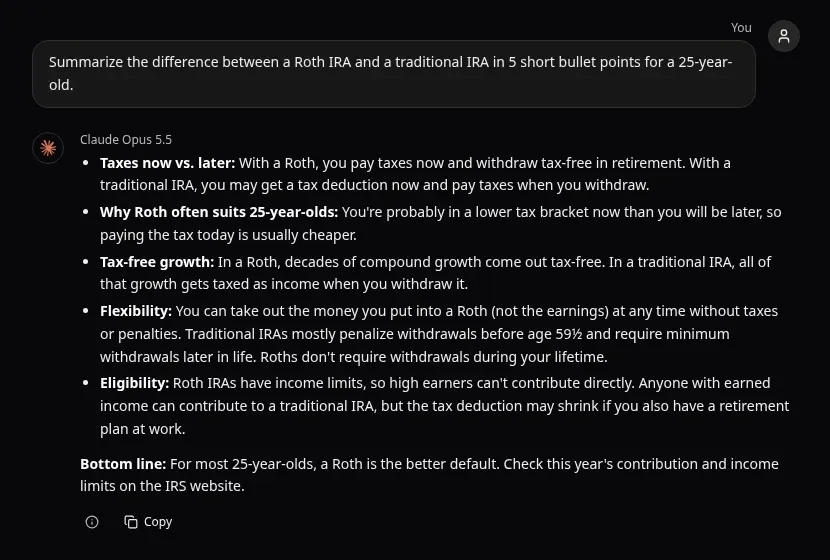
Summarize the difference between a Roth IRA and a traditional IRA in 5 short bullet points for a 25-year-old.
Claude Opus 5.5 in Omnely chat answering the Roth vs traditional IRA prompt in five bullets plus a bottom line.
Try Claude Opus 5.5 in Omnely chat: new users get free credits on sign-up, and chat models need a paid plan.
How to use Claude, step by step
1. Choose where to use it. Anthropic's own Claude app (claude.ai, desktop and mobile) is the official home for Claude and has the richest Claude-only features. Omnely chat is the alternative when Claude needs to sit next to GPT, Gemini, Grok and image or video models in one picker.
2. Pick a Claude model. The Omnely chat picker lists these Claude models (context length up to 1M tokens is listed for Opus and Sonnet):
| Model | Use it for |
|---|---|
| Claude Haiku 4.5 | Fast, simple tasks: short rewrites, quick lookups, quick batch jobs |
| Claude Sonnet 5 | Balanced everyday work: emails, summaries, light analysis |
| Claude Opus 4.7 / 4.8 / 5 | Strong all-round reasoning, longer documents, careful writing |
| Claude Opus 5.5 | Complex writing, analysis and code where quality matters most |
| Claude Fable 5.2 | Anthropic's top tier for long, demanding, multi-step work |
3. Write the first prompt. Include the task, enough context, the audience, and the format you want. "Summarize this contract in 5 bullets for a non-lawyer, flag any clause that mentions auto-renewal" beats "summarize this."
4. Iterate with follow-ups. Short nudges work: "shorter," "more formal," "give two more options," "cut the intro," "turn it into a table."
5. Attach files. In Omnely chat, Claude Opus 4.7/4.8/5/5.5, Sonnet 5 and Haiku 4.5 accept images, PDFs and text/code files. File uploads are available on paid plans.
6. Turn on web search for current facts. Omnely chat shows a web search toggle for supported models, including Claude Opus 5 and 5.5. Use it for prices, news, scores, product specs — anything that changes.
7. Raise reasoning effort for hard problems. Claude Opus models in Omnely expose a reasoning effort control with low / medium / high. For a tricky SQL query or a careful review, set it to high and read the "Thinking process" section.
8. Organize chats in folders. In Omnely chat, long-running work goes into folders so threads stay findable. Starter templates help seed a new chat quickly.
Prompting tips that get better answers from Claude
Anthropic's own prompting guidance points to a handful of moves that reliably lift Claude's output:
- Be clear and direct. Say exactly what the output should be, who it is for, and what "good" looks like.
- Give context and the why. "This is going to a skeptical finance VP who already has the numbers" changes tone and focus instantly.
- Show an example. One sample of the style or format you want (multishot) beats three paragraphs of instructions.
- Separate pasted material with tags. Wrap pasted text in simple tags like
<document>and</document>so Claude knows what is instruction and what is reference. - Ask for a specific format and length. "5 bullets, max 15 words each" or "a 3-column markdown table" is easier to grade than "be concise."
- Break big jobs into steps. Outline first, then draft, then edit, in separate turns.
- Ask Claude to ask clarifying questions first. On ambiguous briefs, say "ask up to 3 questions before starting."
- Ask it to check its own answer. "Review your answer for factual errors and anything that would confuse a beginner. List fixes, then rewrite."
Weak vs better prompt
| Weak | Better |
|---|---|
| "Write an email about the late report." | "Rewrite this message for a direct report who missed a deadline twice. Friendly but firm, under 150 words, keep a clear next step. Draft, then list what you changed." |
Four real Claude Opus 5.5 examples in Omnely chat
All four outputs below were produced by Claude Opus 5.5 in Omnely chat on 17 November 2026. Short phrases in quotes are from the real transcripts.
Summarize a topic in five bullets
Summarize the difference between a Roth IRA and a traditional IRA in 5 short bullet points for a 25-year-old.See the screenshot at the top. Claude Opus 5.5 returned five tight bullets — taxes now vs. later, why a Roth often suits 25-year-olds, tax-free growth, flexibility of Roth contributions, and eligibility — then a "Bottom line" calling a Roth the better default and telling the reader to "Check this year's contribution and income limits on the IRS website." This is general information, not financial advice. The prompt worked because it set a count (5), a format (short bullets) and an audience (25-year-old), and Claude added a natural one-line conclusion.
Rewrite an email: friendly but firm
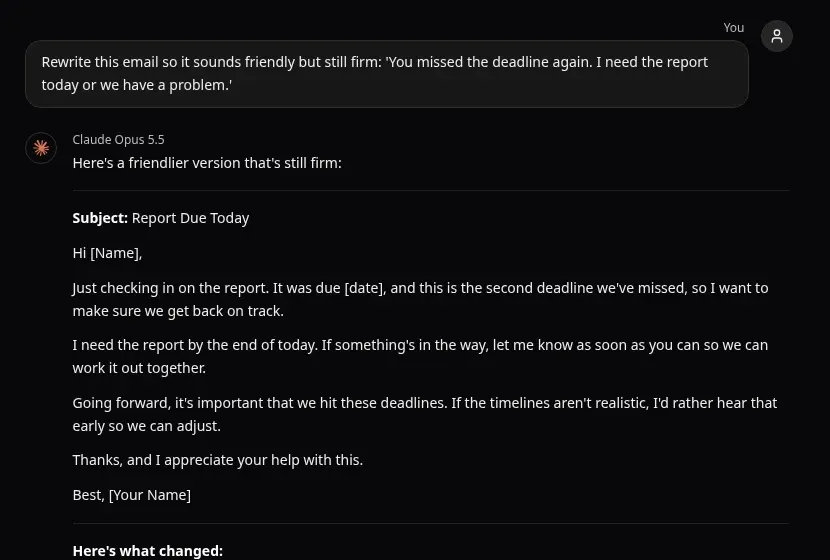
Rewrite this email so it sounds friendly but still firm: 'You missed the deadline again. I need the report today or we have a problem.'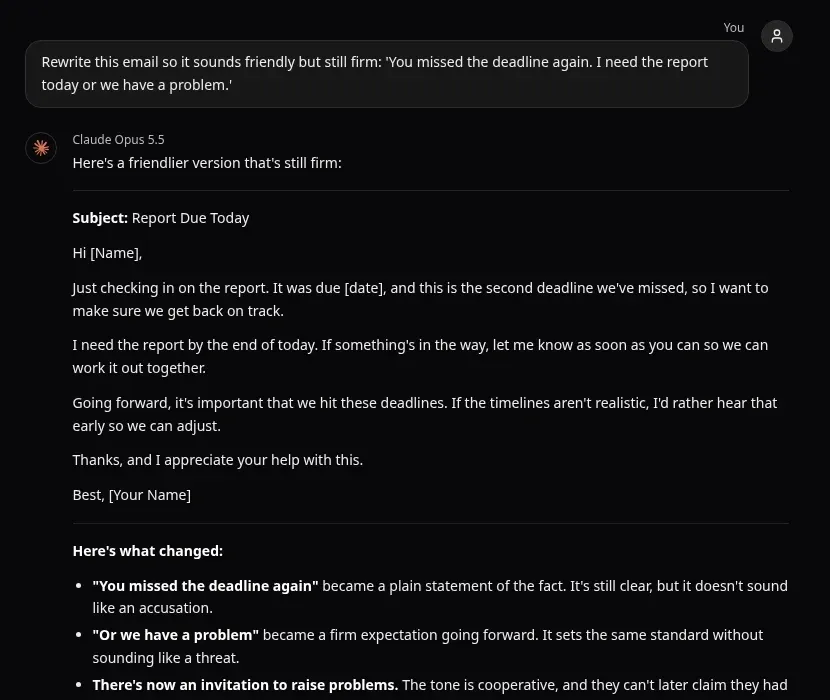
Claude Opus 5.5 in Omnely chat: a rewritten "Report Due Today" email, followed by a list of what changed (crop shows the first three of four notes).
Claude Opus 5.5 produced a full email with subject line "Report Due Today," an opener that states the fact without accusing, a hard "end of today" deadline, and an invitation to flag blockers. It then listed four specific changes — for example, that the missed-deadline line became a plain statement of the fact, and the "problem" line became a firm expectation going forward — and offered a shorter, more formal or more relaxed version on request. The prompt worked because it named two competing constraints ("friendly but still firm") and gave the source text, so Claude had something concrete to transform.
Write and explain Python code
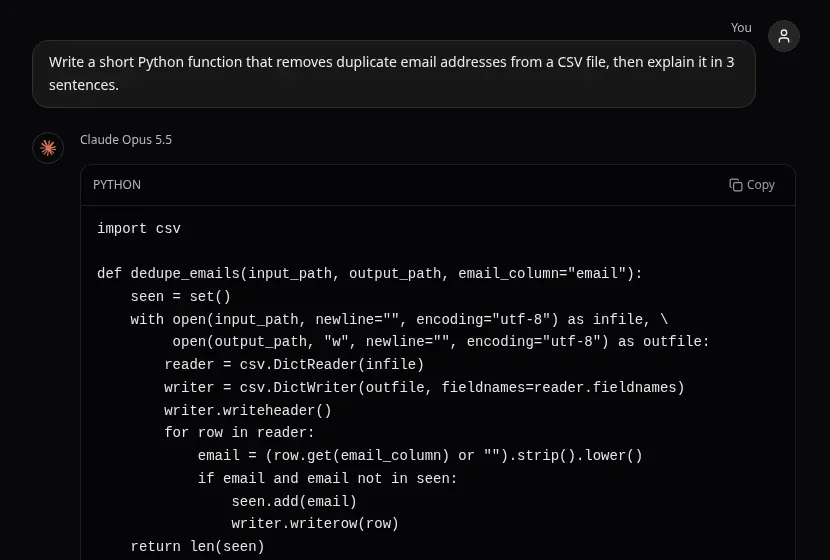
Write a short Python function that removes duplicate email addresses from a CSV file, then explain it in 3 sentences.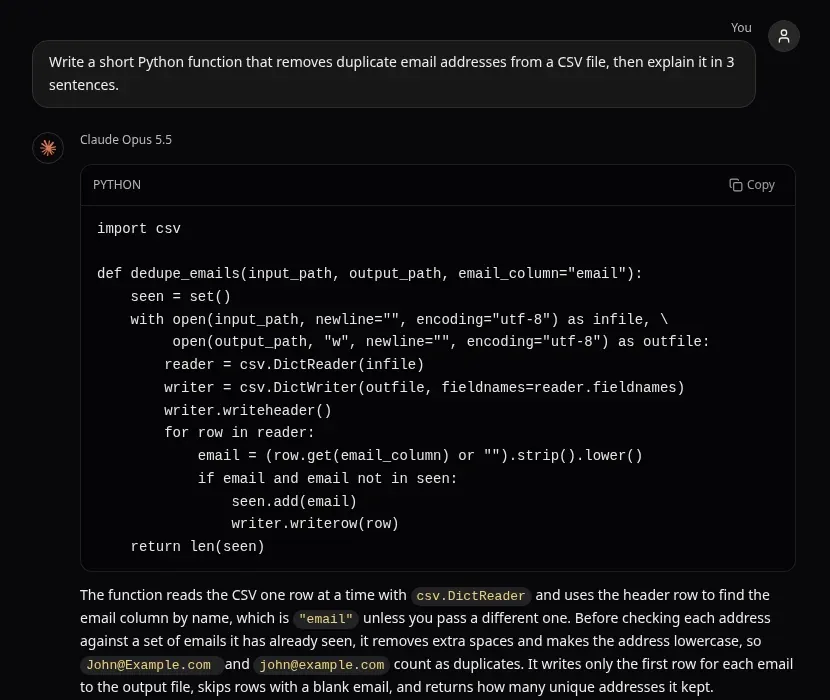
Claude Opus 5.5 in Omnely chat: the dedupe_emails function and its three-sentence explanation.
Claude Opus 5.5 returned a working, idiomatic function that reads with csv.DictReader, normalizes each address (strip().lower()), skips blanks, keeps the first occurrence in a set, and returns the kept count. Here is the real function verbatim:
import csv

def dedupe_emails(input_path, output_path, email_column="email"):
    seen = set()
    with open(input_path, newline="", encoding="utf-8") as infile, \
         open(output_path, "w", newline="", encoding="utf-8") as outfile:
        reader = csv.DictReader(infile)
        writer = csv.DictWriter(outfile, fieldnames=reader.fieldnames)
        writer.writeheader()
        for row in reader:
            email = (row.get(email_column) or "").strip().lower()
            if email and email not in seen:
                seen.add(email)
                writer.writerow(row)
    return len(seen)
The three-sentence explanation noted that the function finds the email column by header name, that it lowercases and trims before comparing so that "John@Example.com and john@example.com count as duplicates," and that it writes only the first row for each email and returns the count. The prompt worked because it set a shape (short function, then 3 sentences) and Claude handled the upper/lowercase edge case on its own.
Build a study plan as a table
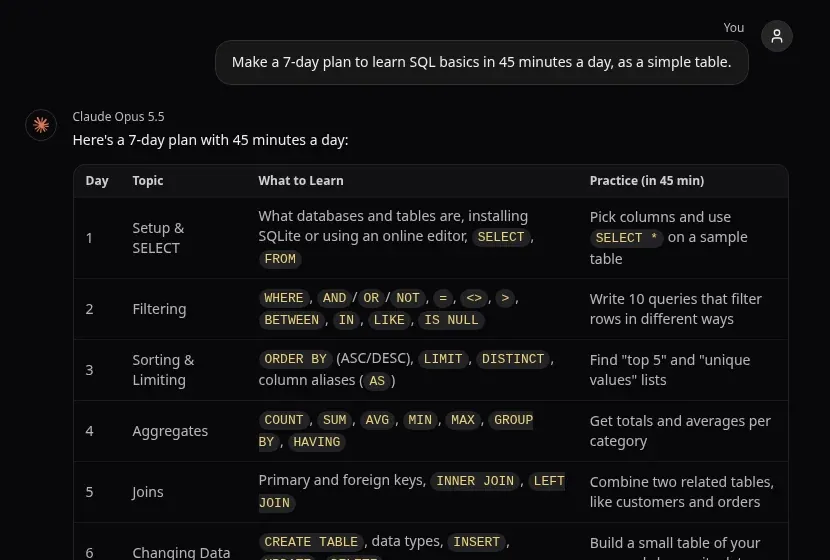
Make a 7-day plan to learn SQL basics in 45 minutes a day, as a simple table.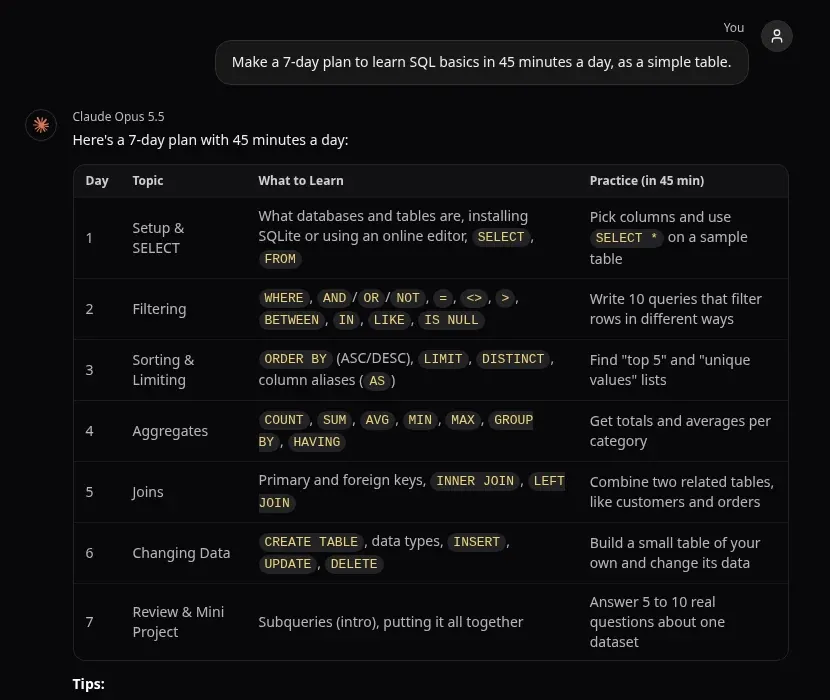
Claude Opus 5.5 in Omnely chat: the 7-day SQL plan table (tips below the table are cut off in this crop).
Claude Opus 5.5 returned a 4-column table (Day, Topic, What to Learn, Practice in 45 min) covering SELECT, filtering, sorting, aggregates, joins, data changes, and a review mini-project. Below is the excerpt (first 3 rows) from the real transcript:
| Day | Topic | What to Learn | Practice (in 45 min) |
|---|---|---|---|
| 1 | Setup & SELECT | What databases and tables are, installing SQLite or using an online editor, SELECT, FROM | Pick columns and use SELECT * on a sample table |
| 2 | Filtering | WHERE, AND/OR/NOT, =, <>, >, BETWEEN, IN, LIKE, IS NULL | Write 10 queries that filter rows in different ways |
| 3 | Sorting & Limiting | ORDER BY (ASC/DESC), LIMIT, DISTINCT, column aliases (AS) | Find "top 5" and "unique values" lists |
Claude added three tips below the table, including places to practice (SQLBolt, SQLZoo, Mode, DB Fiddle), a daily split of "about 15 minutes learning the concept and 30 minutes writing queries," and a Day-6 warning: "Always use WHERE with UPDATE and DELETE." The prompt worked because it set a time budget (45 min/day), a duration (7 days), and a format (simple table), so Claude could structure the whole answer around those constraints.
Working with files, PDFs and images
In Omnely chat, Claude Opus 4.7/4.8/5/5.5, Sonnet 5 and Haiku 4.5 accept image, PDF and text/code attachments. File uploads are on paid plans. Useful asks:
- "Write a 10-bullet summary of this PDF with page references."
- "Extract the table on page 4 as markdown."
- "List every action item assigned to Priya, with the page it appears on."
- "Compare these two contracts. What is different in the termination clauses?"
- "This is a screenshot of a dashboard. What is the top-performing channel and why?"
A few honest habits make file work reliable. Check any numbers or dates Claude cites against the source — long documents are where hallucinations hide. Split very large PDFs into themed chunks and feed them one at a time if a single file feels too big. When asking about a specific page, use the page number from the viewer, not the printed page number inside the document. Anthropic's Claude app documents its own upload size and page limits; refer to the Help Center for exact numbers.
Reuse a context block in every new chat
To keep Claude's answers consistent from one chat to the next, paste a short reusable context block at the top of a new chat, or start from a chat template:
<context>
Role: You are a careful senior editor.
Audience: Non-technical SaaS customers.
Voice: Plain English, short sentences, no hype, no emojis.
Constraints: Never invent numbers. If unsure, say "unknown" and ask one question.
Format default: Headings + bullets. Max 250 words unless asked.
</context>

Task: {put the real request here}
Using Claude next to image and video models
One of the practical reasons to use Claude inside an all-in-one workspace is that the same chat can plan a visual, then hand it to a model built to render it. Claude writes a precise image brief — subject, composition, lighting, style, on-image text — and GPT Image 2 renders it at 1K, 2K or 4K, text-to-image or image-to-image with up to 16 reference images and strong on-image text. For motion, Claude drafts a shot list and dialogue, and Veo 3.1 turns it into video with native synchronized audio — dialogue, sound effects and ambient — at 1080p or 4K.
A reusable prompt for the hand-off:
Write an image prompt I can paste into a text-to-image model.
Subject: a quiet home office at dusk, warm desk lamp, laptop open to a graph.
Return: one paragraph (max 80 words), then a bullet list of style, camera, lighting, mood, and on-image text (if any).
For honest cross-model comparisons without switching tabs, Claude vs Gemini and Claude AI vs ChatGPT walk through side-by-side answers in one workspace.
Make images, video and speech from Claude with Omnely MCP
Anthropic's Claude app doesn't generate photos or illustrations — its in-chat visuals are HTML/SVG diagrams, charts and interactive visuals — and it doesn't produce video clips either. That means turning a Claude-written brief into a finished image or short video usually involves switching apps and copy-pasting prompts across separate tools, which slows the whole workflow down.
Omnely MCP (beta) closes that loop by connecting Claude directly to Omnely's image, video and speech generation, using your own Omnely account, credits and models.
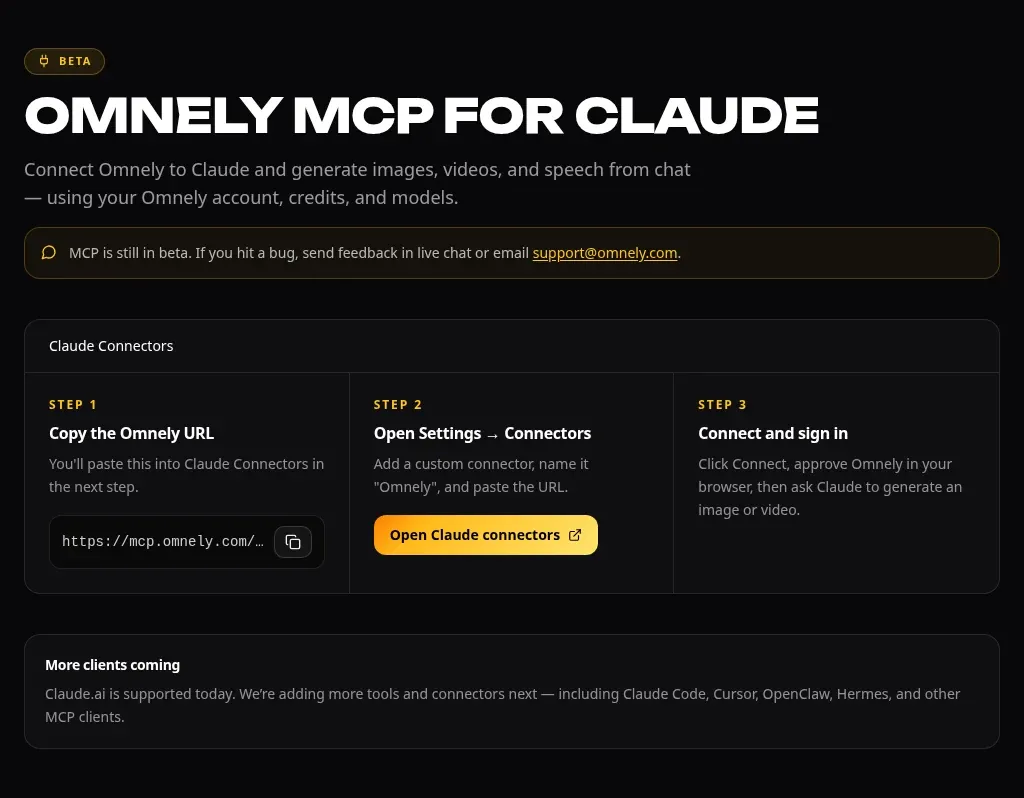
The live Omnely MCP page (beta): copy the server URL, add it as a custom connector in Claude, then connect and sign in.
Setup takes three steps:
1. Copy the Omnely server URL: https://mcp.omnely.com/mcp
2. In Claude, open Settings → Connectors, add a custom connector, name it "Omnely", and paste the URL.
3. Click Connect, approve Omnely in the browser (sign in), then ask Claude to generate an image or video.
Claude.ai is supported today; Claude Code, Cursor, OpenClaw, Hermes and other MCP clients are listed as coming. Omnely MCP is still in beta, so bugs can be reported via live chat on the site or by emailing support@omnely.com.
Once the connector is live, prompts can be written in plain language inside a Claude conversation. For example:
Using Omnely, generate an image of a minimalist home office at golden hour, warm light, shallow depth of field, 16:9. Then draft a 6-second video brief based on the same scene for me to approve.Limits and mistakes to know
- Claude can be confidently wrong. Verify high-stakes facts, numbers and code. Treat any legal, medical, tax or safety answer as a starting point, not a decision.
- Turn on web search for anything current. Model knowledge has a cutoff; prices, scores, laws and product specs change.
- Long chats drift. When the topic changes materially, start a new chat. A fresh thread per topic keeps Claude focused.
- Usage limits exist on Anthropic's app. Sessions reset on a rolling window and vary by plan; long chats, large files, stronger models and higher reasoning effort use the budget faster. See Claude pricing for plan and limit details.
- Don't paste secrets. Keep passwords, API keys and private personal data out of any chat.
- Mind the model. Haiku is fast but weaker on judgment; Opus 5.5 and Fable 5.2 are slower but far more careful. Pick the smallest model that handles the task.
FAQ
What is the best way to start using Claude?
Open Anthropic's Claude app or Omnely chat with Claude Opus 5.5, write one clear task with context and the format you want, and iterate with short follow-ups. Start on an everyday task — summarize a doc, rewrite a message, plan a week — before reaching for coding or deep analysis.
Which Claude model fits which task?
Use Haiku 4.5 for fast simple work, Sonnet 5 for balanced everyday tasks, Opus 5 or 5.5 for complex writing, analysis and code, and Fable 5.2 when the job is long and demanding. If quality matters more than speed, default to Opus 5.5.
Can Claude read PDFs and images?
Yes. In Omnely chat, Claude Opus 4.7/4.8/5/5.5, Sonnet 5 and Haiku 4.5 accept images, PDFs and text/code files on paid plans. Ask for page references, extracted tables or compared clauses, and spot-check the numbers.
Can Claude make images or videos?
Claude itself writes text (and will draw charts and diagrams in Anthropic's app), not photos or illustrations. In Omnely, hand Claude's brief to GPT Image 2 for images or Veo 3.1 for video with native audio.
Can Claude and ChatGPT be used in the same place?
Yes — the Omnely chat picker lists Claude (Haiku 4.5, Sonnet 5, Opus 4.7/4.8/5/5.5, Fable 5.2) alongside GPT, Gemini, Grok and others, and the model can be switched per conversation. That makes cross-checking the same prompt across models fast.
Paste the four exact prompts above into Omnely chat with Claude Opus 5.5 and compare the answers with the ones shown here, then try the same prompts on GPT or Gemini in the same picker to see which model fits each kind of task. New users get free credits on sign-up, and chat models need a paid plan.