Veo 3 prompts that actually work
Veo 3 prompts that work on Omnely: a 7-part formula, pasteable text-to-video and image-to-video prompts with audio cues, and real Veo 3.1 Fast clips.

Video generations are mostly decided by the prompt. The model matters, but the difference between a clip worth posting and a clip worth deleting is usually the words fed into it. This playbook is a pasteable stack of veo 3 prompts tuned for Veo 3.1 on Omnely, which offers Veo 3.1 Fast and Veo 3.1 Quality in its video workspace: the structures, dialogue blocks, camera moves, and image-to-video patterns that hold up in a real render. Everything here matches what Veo 3.1 supports on Omnely: text-to-video and image-to-video, 8-second clips, native audio generated from the prompt, 720p, 1080p, or 4K output, and 16:9 or 9:16 framing. Veo 3.1 Fast also takes up to 2 reference frames (one start frame, or a start and end pair).
No fluff, no theory-only paragraphs. Copy the blocks, swap the nouns, render.
Anatomy of veo 3 prompts that stick
Veo 3.1 rewards structure. The prompts that consistently land use a 7-part formula, roughly in this order:
1. Subject — who or what, with 2–3 identity anchors (age, wardrobe, distinguishing feature)
2. Action — one clear verb, not three stacked
3. Scene — location, time of day, weather, background layers
4. Camera — one primary move (dolly in, slow pan left, static, handheld push)
5. Lighting — direction + quality (soft key from left, harsh backlight, neon underglow)
6. Style — film stock, lens, aesthetic reference (35mm, anamorphic, Kodak Portra, documentary)
7. Audio — dialogue in quotes, ambient bed, specific SFX
The audio block is the highest-ROI addition and the one most people skip. Veo 3.1 will generate native sound from your prompt — dialogue, footsteps, wind, room tone — but only if you write it. A silent prompt gets you a silent clip.
Two rules that prevent wasted renders:
- One primary camera move per 8-second clip. "Dolly in while panning right while tilting up" produces mush. Pick one.
- Match the container. Every Veo 3.1 clip on Omnely is 8 seconds. Write the action so it starts, peaks, and resolves inside that window. Choose 16:9 for cinematic and 9:16 for social before you write, because framing changes the composition language.
Tip: If you can't describe the shot to a DP in one breath, the prompt is too crowded. Cut adjectives, keep nouns and verbs.
Veo 3 prompts in action: real clips from Omnely
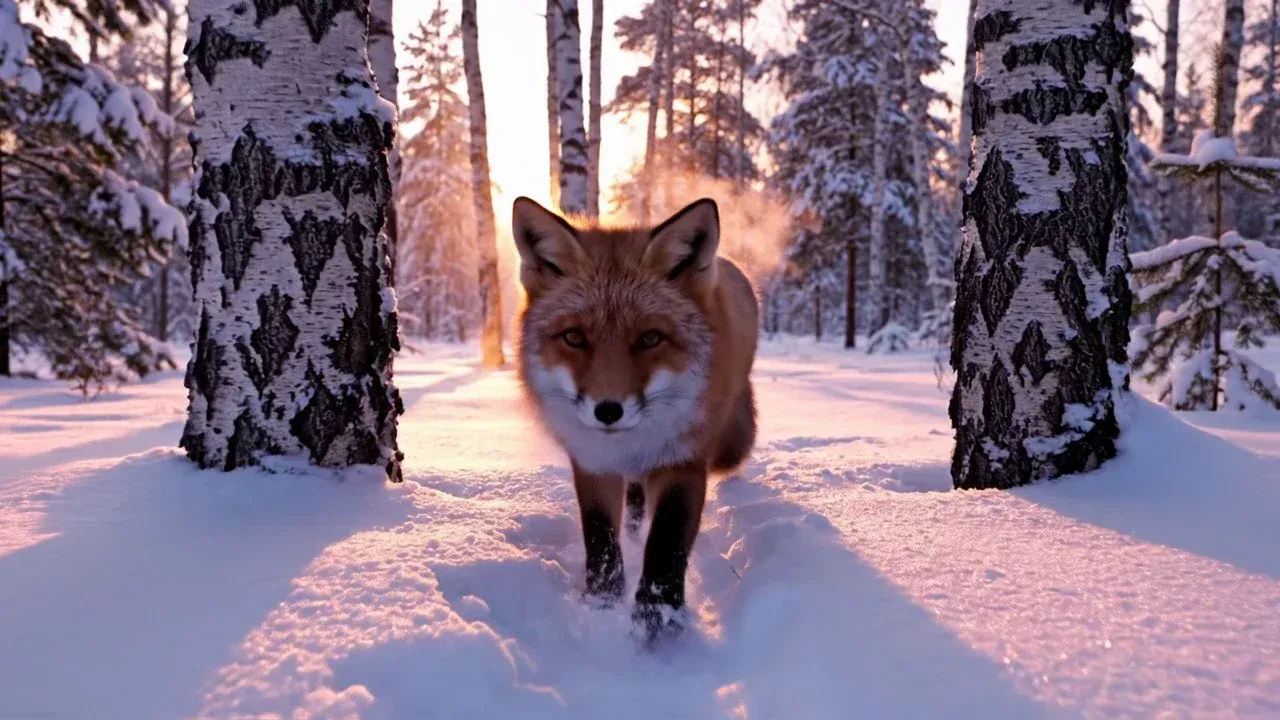
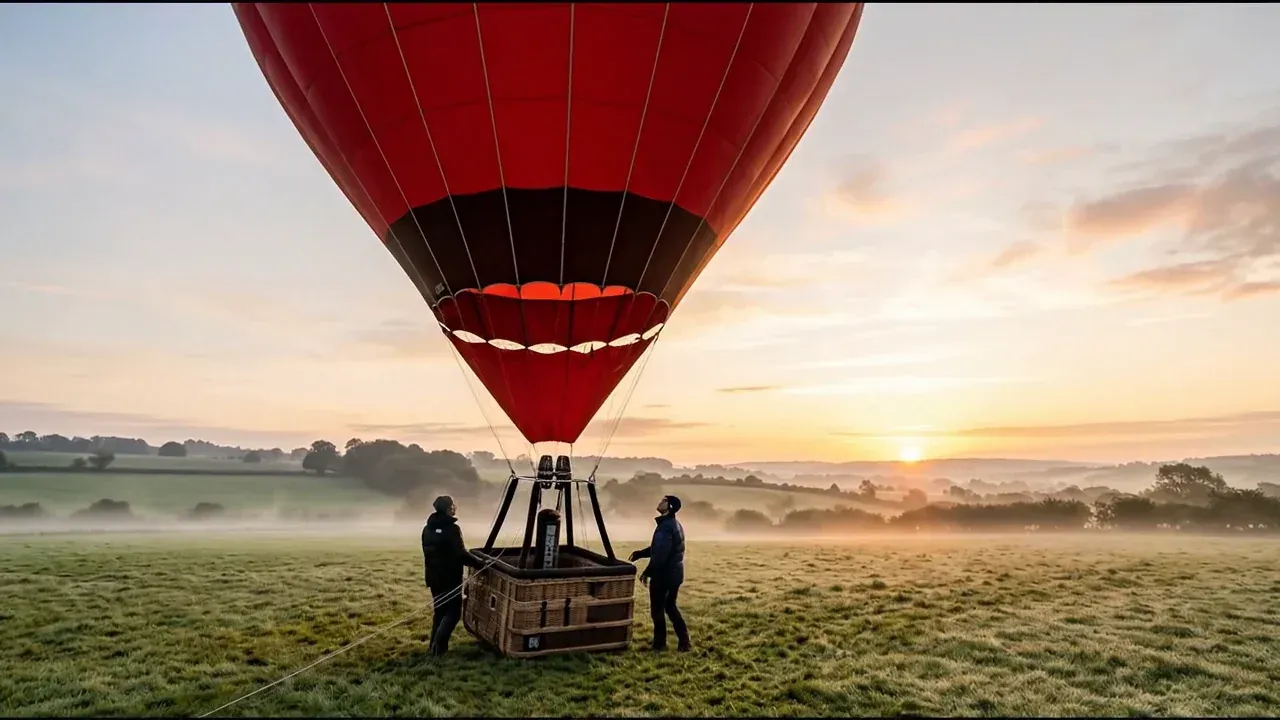
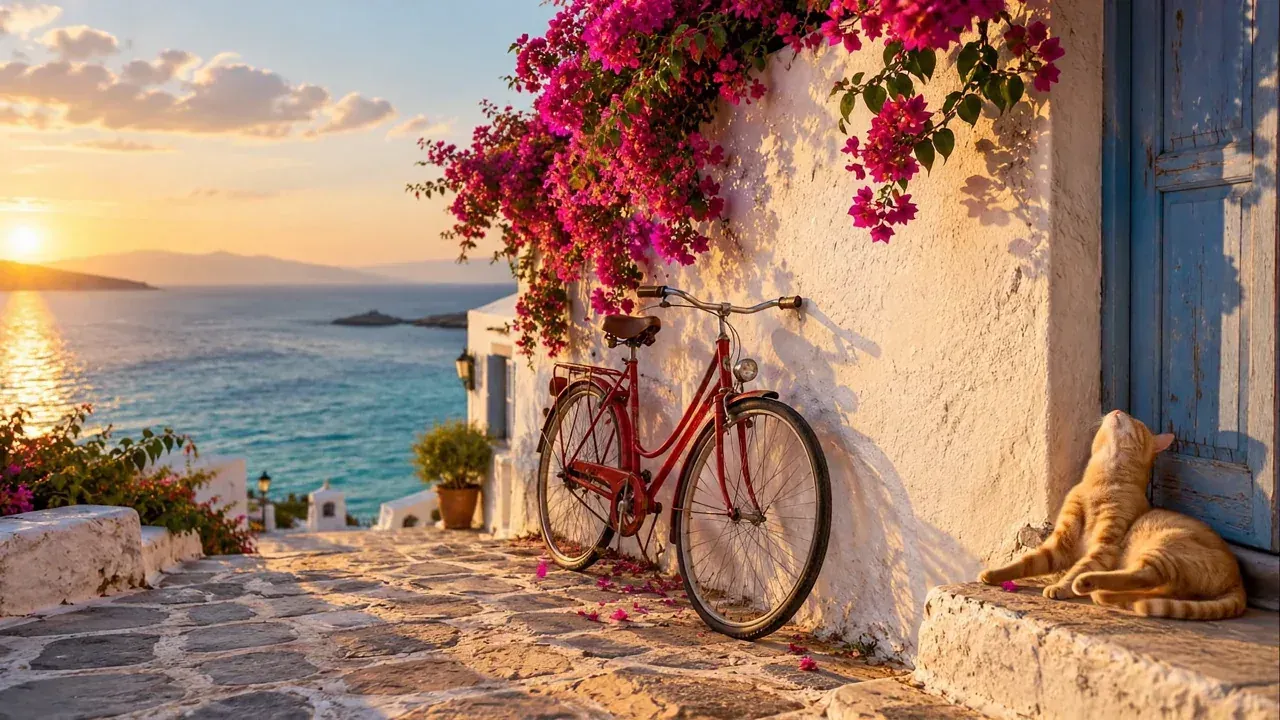
The three clips below were rendered on Omnely with Veo 3.1 Fast: 8 seconds, 16:9, 720p, with native audio. Press play to hear the audio the prompt asked for. The first is text-to-video from a single prompt; the other two are image-to-video, so their prompts describe only motion, camera, and sound.
Text-to-video: fox in snow. Subject, action, camera, light, and an Audio: line, all in one prompt.
A red fox trots through fresh snow between birch trees at dawn, small puffs of snow kicked up by its paws, its breath visible in the cold air, low tracking camera moving alongside at the fox's height, soft pink morning light through the trees, realistic motion, 16:9. Audio: crunching snow, light wind, distant crows.Image-to-video: hot air balloon at sunrise. The start frame was generated first with Nano Banana 2, then animated with this prompt.
The balloon envelope slowly swells upright as the burner fires in short bursts, the crew steps back and the ropes go slack, mist drifts across the meadow, the camera pushes in slowly and tilts up to follow the balloon, golden sunrise light, realistic motion. Audio: the roar of the propane burner in bursts, wind in the grass, distant birdsong, no music, no dialogue.Image-to-video: cat and bicycle. The start frame came from GPT Image 2; the prompt keeps the scene fixed and asks only for motion and ambient sound.
Animate this exact scene. A gentle sea breeze moves the bougainvillea petals and a few petals drift down past the bicycle. The ginger cat slowly lifts its head and stretches. Small waves roll in and sparkle on the sea in the background. Slow, subtle camera push-in toward the bicycle. Warm golden-hour light stays consistent. Ambient sound: soft waves, light wind, distant seagulls. No text, no people.Pasteable veo 3 prompts — cinematic & dialogue
These are drop-in prompts. Change the italicized parts to fit your subject. Each one respects the 8-second beat and includes an explicit audio block.
1. Cinematic character close-up with dialogue
Subject: A woman in her early 30s with rain-soaked dark hair, wearing a charcoal wool coat, standing under a flickering streetlamp.
Action: She looks up slowly, exhales visible breath, then speaks directly to camera.
Scene: Empty city alley at 2am, wet pavement reflecting neon signage, light fog in background.
Camera: Slow dolly in from medium to medium-close-up over 8 seconds.
Lighting: Cool cyan key from the streetlamp above, warm amber rim from a distant sign behind her.
Style: 35mm anamorphic, shallow depth of field, subtle film grain, muted contrast.
Audio: She says, "You promised this street was safe." Ambient: distant traffic hum, light rain on metal, a single wet footstep off-camera at second 6.
Duration: 8 seconds. Aspect: 16:9.
2. Two-hander dialogue exchange
Subject: Two chefs in a small restaurant kitchen — a bearded man in his 40s in a stained white jacket, and a younger woman with a shaved side-cut in a black apron.
Action: The man plates a dish; she leans in to inspect it and reacts.
Scene: Cramped professional kitchen, steam rising from a pot in the background, warm tungsten light.
Camera: Static medium two-shot, subtle handheld drift.
Lighting: Overhead tungsten practical, soft bounce from stainless steel surfaces.
Style: Documentary realism, 50mm lens, natural color.
Audio: Man says, "Taste it before you judge it." She replies, "Fine, but the sauce is still wrong." Ambient: sizzling pan, low kitchen ticket printer, distant pot clang.
Duration: 8 seconds. Aspect: 16:9.
3. Landscape establishing shot, no dialogue
Subject: A lone red kayak drifting on a glassy alpine lake.
Action: The kayak glides slowly left to right; a paddle dips once mid-clip.
Scene: Sunrise, mist hovering above the water, snow-capped peaks in the far background, pine forest along the shore.
Camera: Slow drone push-in, low altitude, from wide to medium wide.
Lighting: Golden hour, warm sun from screen-right, cool blue ambient shadow.
Style: Cinematic nature documentary, 24mm equivalent, high dynamic range.
Audio: Ambient loon call at second 2, single paddle dip splash at second 5, low mountain wind bed throughout. No dialogue.
Duration: 8 seconds. Aspect: 16:9.
4. Genre piece — noir monologue
Subject: A tired detective in his 50s, gray stubble, rumpled trench coat, sitting alone at a diner counter.
Action: He stirs black coffee, pauses, delivers a quiet line to no one.
Scene: 3am diner interior, red vinyl stools, chrome trim, empty booths behind him.
Camera: Static medium shot, very slow push-in.
Lighting: Overhead fluorescent from above, warm neon window glow from screen-left.
Style: Neo-noir, high contrast, 40mm lens, subtle green shadow tint.
Audio: He mutters, "Trouble. Knew it from hello." Ambient: distant jukebox playing a slow blues track at low volume, coffee spoon clink at second 3, refrigerator hum bed.
Duration: 8 seconds. Aspect: 16:9.
Pasteable veo 3 prompts — product, social, I2V
Product and social clips need different pacing. Product = hero the object, tight action, clean audio. Social vertical = subject fills the frame, one strong beat, punchy SFX.
5. Product hero — wireless earbuds
Subject: Matte black wireless earbuds in an open charging case on wet black slate, minimal white branding.
Action: Condensation beads slide down the case lid; at second 4, one earbud lifts slowly out of the cradle.
Scene: Dark studio with a single hard rim light from behind, faint atmospheric haze.
Camera: Slow orbit right around the case, 45 degrees over 8 seconds.
Lighting: Hard blue rim from back-left, soft white fill from front-right, deep black background.
Style: Premium product cinematography, 100mm macro, ultra-shallow depth of field.
Audio: Rising synth pad from second 0 to 4, soft magnetic click at second 4, quiet room tone from second 4 to 8. No dialogue.
Duration: 8 seconds. Aspect: 16:9.
6. Social vertical — creator selfie hook (9:16)
Subject: A woman in her mid-20s with bright coral lipstick and a mustard hoodie, filming herself handheld.
Action: She widens her eyes in fake shock, holds up a phone screen toward camera, then laughs.
Scene: Sunlit bedroom with pastel poster wall behind her.
Camera: Handheld selfie framing, subtle shake, static composition.
Lighting: Soft window daylight from screen-left.
Style: Modern creator vlog, phone-camera realism, natural color, slight lens distortion.
Audio: She says, "Okay wait — you HAVE to see this." Ambient: soft room tone, single notification ding at second 5.
Duration: 8 seconds. Aspect: 9:16.
7. Image-to-video — one start frame
For I2V, the still already tells Veo 3.1 who and where. Your prompt only describes motion, camera, and audio. Do not redescribe the subject's clothing, face, or scene — you will fight the reference.
Motion: The subject in the reference frame turns their head slowly to the right, then breaks into a small smile.
Camera: Static shot, no movement.
Audio: Soft ambient café bed, faint espresso machine hiss at second 6. No dialogue.
Duration: 8 seconds. Aspect: 16:9.
8. Image-to-video — start + end frames (max 2)
Veo 3.1 Fast on Omnely accepts up to 2 reference images: one start frame, or a start + end pair. Do not upload three.
Motion: Transition smoothly from the first reference (empty street) to the second reference (same street filled with morning commuters).
Camera: Locked static wide shot.
Audio: Rising city ambience — starts with distant birds, builds to layered footsteps, car horns, and crowd murmur by second 8. No dialogue.
Duration: 8 seconds. Aspect: 16:9.
Multi-shot continuity with veo 3 prompts
Veo 3.1 clips on Omnely are 8 seconds each, so continuity between clips comes from prompt discipline rather than a long single take.
Rules that keep a subject consistent across a sequence:
- Copy the identity block verbatim between prompts. Same age, same wardrobe, same distinguishing feature, same lens, same lighting direction. Even punctuation changes can drift the face.
- Change only what needs to change — the action, the camera move, or the location beat. Everything else stays word-for-word.
- Use shot-list beats inside a single 8s clip when you want a mini-sequence. Veo 3.1 responds to timestamps.
Example of internal beats within one 8-second generation:
Subject: [locked identity block — copy across all clips in the sequence]
Beats:
  0–2s: She opens the front door, morning light spills in.
  2–5s: She steps onto the porch, looks left down the street.
  5–8s: Close-up on her face as she smiles softly.
Camera: Motivated handheld follow, one continuous take.
Lighting: Warm morning sun from screen-right.
Audio: Door creak at 0.5s, birds throughout, she whispers, "Finally," at second 7.
Duration: 8 seconds. Aspect: 16:9.
For a longer story, render clips 1, 2, 3 separately with the same locked identity block and edit them together in any video editor.
Prompt mistakes that waste Veo 3.1 renders
Every failed render is a wasted render. These are the five patterns behind most of them:
- Missing audio block. No audio line means Veo 3.1 guesses — usually silence or generic music. Always write at least one ambient line and any dialogue in quotes.
- Stacked conflicting camera moves. "Dolly in, pan right, tilt up, then crane down" in 8 seconds produces a queasy blur. One primary move per clip. Add "static" if you're not sure.
- Vague adjectives instead of nouns. "Beautiful cinematic epic shot" tells the model nothing. "35mm anamorphic, shallow depth of field, backlit at golden hour" is a real instruction.
- Redescribing the still for I2V. When you supply a reference image, describing the subject's clothing and face fights the frame. Only describe motion, camera, and audio.
- Assuming features that aren't there. Veo 3.1 Fast on Omnely accepts a maximum of 2 reference images (start, or start + end), and duration is fixed at 8 seconds. Do not prompt "make this a 15-second clip" or "use these 4 reference shots"; those instructions get ignored and the prompt loses focus.
Run these veo 3 prompts on Veo 3.1 in Omnely
Every prompt in this post is written for Veo 3.1 as it behaves on Omnely: 8-second clips, native audio from the prompt, 720p / 1080p / 4K, 16:9 or 9:16. Paste one, swap the subject, and iterate on Fast before re-rendering a keeper on Quality.
- Open the model page: Veo 3.1 on Omnely
- Compare other video engines in the same workspace: Kling 3.0 and Seedance 2.0, or browse all models
- Open the video workspace to render
- Comparing engines? Read Kling vs Veo 3
Omnely is an all-in-one workspace for AI models, and the video models need a paid plan; new users get free credits when they sign up. The prompts that work are the plain ones: clear subject, one camera move, real audio, and a tight 8-second beat. Keep the 7-part formula next to the editor and the share of usable clips will climb.